2026. 2. 12. 13:18 오라클
Oracle 26ai RAC 설치
미루고 있던 Oracle 26ai RAC 설치/구성을 해 보았다.
작업 과정 자체는 19c 와 크게 달라진 것은 없고 느끼는 점은 굉장히 무거워졌다.
노트북 메모리 32G인데 Virtualbox 내에서 돌리기가 굉장히 버겁다..노트북이 살려줘하는 느낌..
Multitenant 구조라 database 생성하는데 6시간 걸림..샤갈...
=============================================
설치환경 : REHL 9.7
Oracle 23.26.1.0.0
- Directory 사전 생성
mkdir -p /u01/app/oracle
mkdir -p /u01/app/26.0.0.0/grid
mkdir -p /u01/app/oracle/product/26.0.0.0/dbhome_1
chown -R oracle:dba /u01
- Oracle Grid Infrastructure S/W설치
1. 설치파일을 FTP로 해당서버에upload
LINUX.X64_2326100_grid_home.zip <-- 설치 Image 파일
p6880880_230000_Linux-x86-64.zip <-- OPatch 파일
2. 설치이미지 압축해제 (반드시 $GI_HOME 밑에 압축해제 해야 함)
unzip LINUX.X64_2326100_grid_home.zip -d $GI_HOME
unzip p6880880_230000_Linux-x86-64.zip -d $GI_HOME
3. gridSetup.sh실행
xhost +
su – oracle
export DISPLAY=작업PC IP:0.0
cd $GI_HOME
./ gridSetup.sh 실행

[Configure Oracle Grid Infrastructure for a New Cluster 선택후, Next]
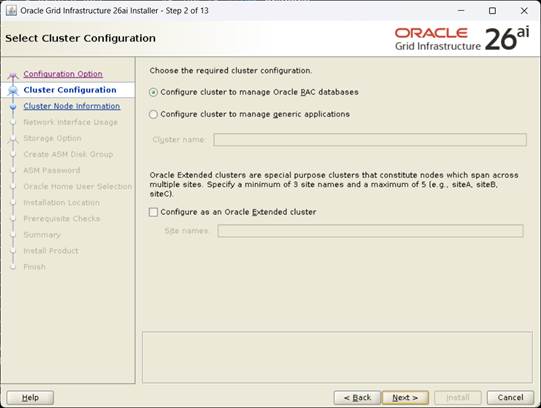
[Configure Clusterto manage Oracle RAC databases, Next]
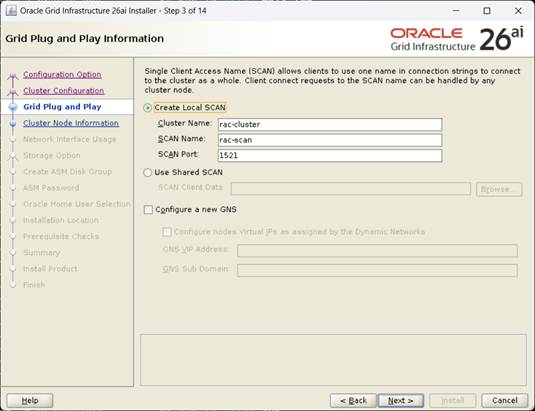
[Cluster Name, SCAN Name 지정후, Next]

[add 버튼으로 rac2노드 추가 후 passwordless ssh , Next]

[Network Interface 지정 후, Next]

[Use Oracle Flex ASM for storage 선택 후, Next]
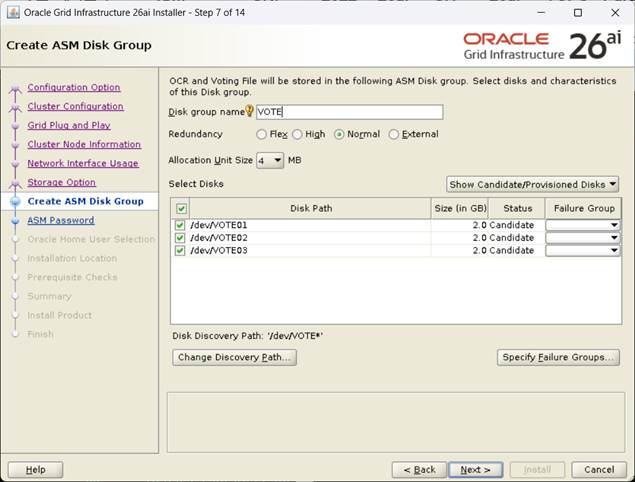
[VOTE 디스크 지정 후, Next] 여기서는 Normal로 구성함
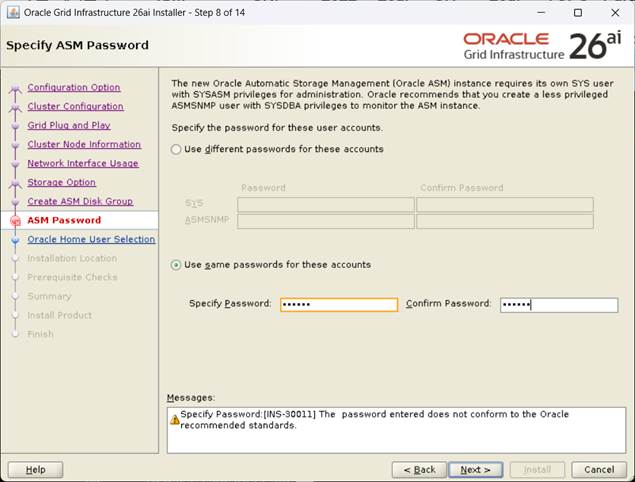
[비밀번호 지정 후, Next]
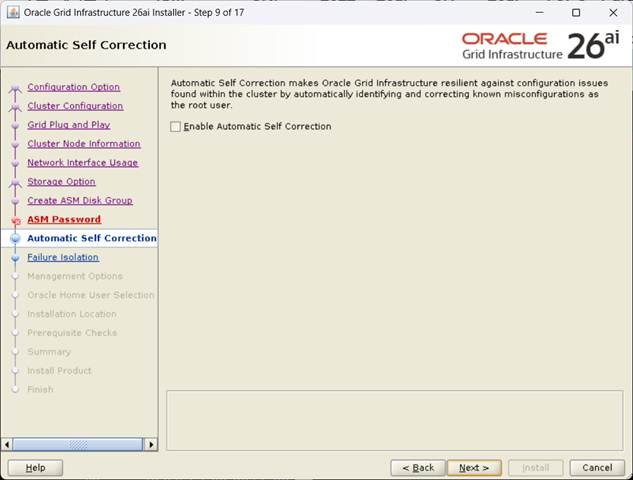
[Enable Automatic Self Correction uncheck, Next]
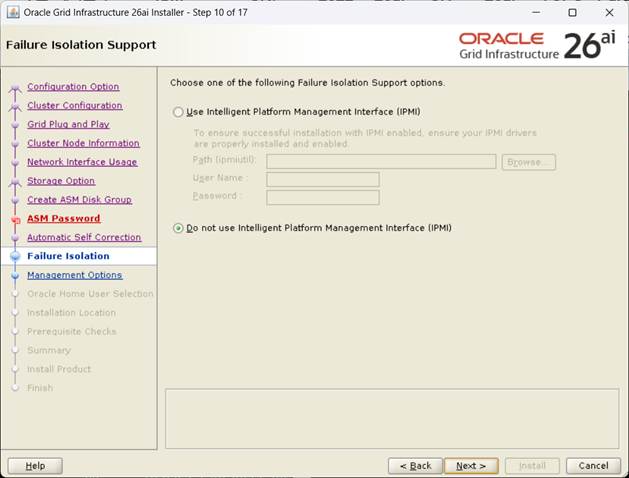
[Do not use IPMI , Next]

[EM 미구성, Next]

[dba 그룹지정후, Next]
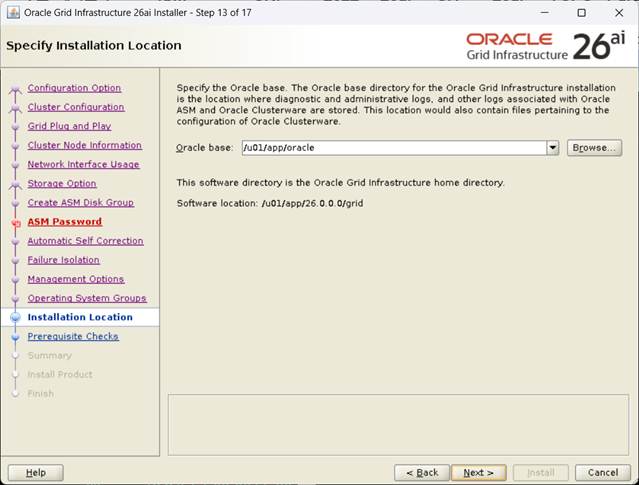
[GI Base 지정 후, Next]
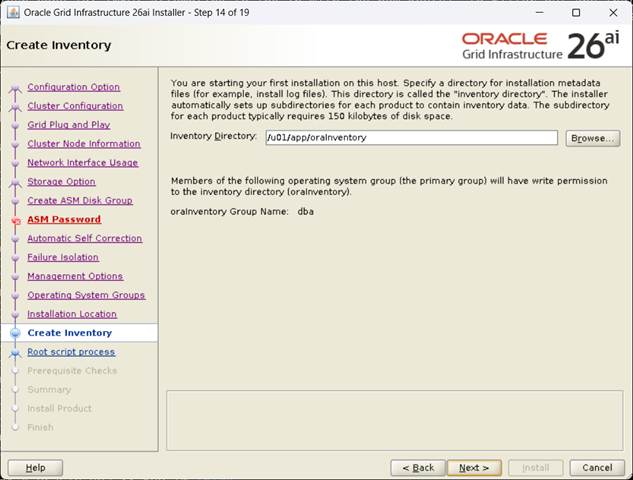
[Inventory 지정후, Next]
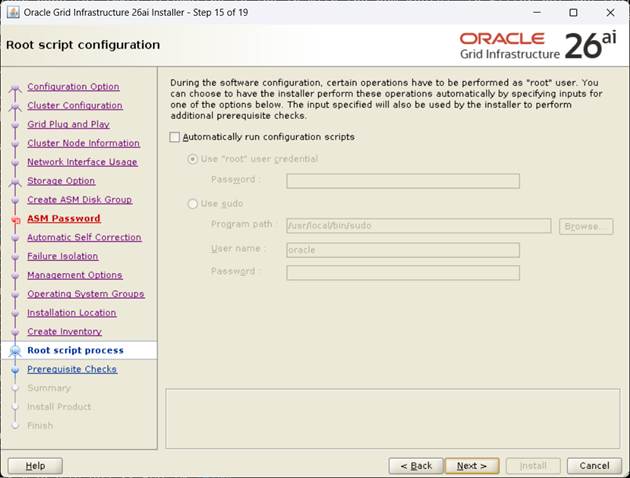
[자동 스크립트 uncheck후, Next]
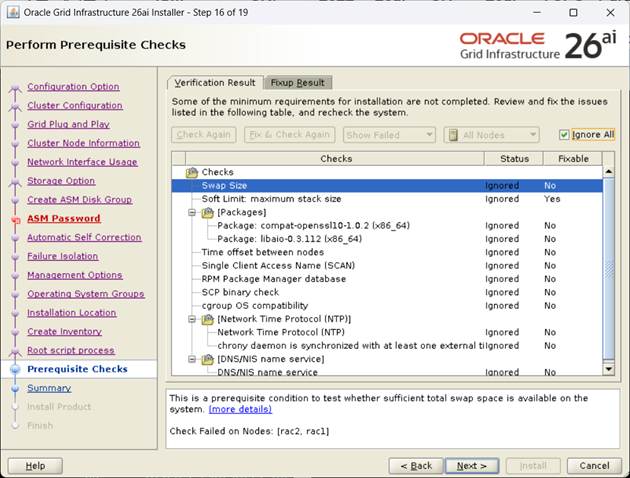
[Fixup 후 Ignore All check 후, Next]
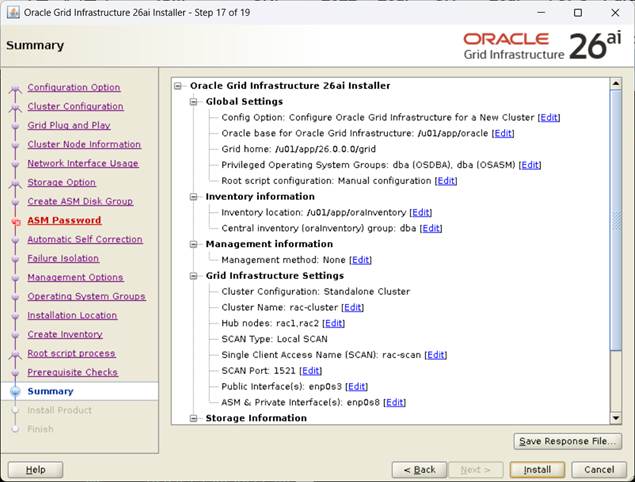
[rsp 파일 저장후, Install Click]
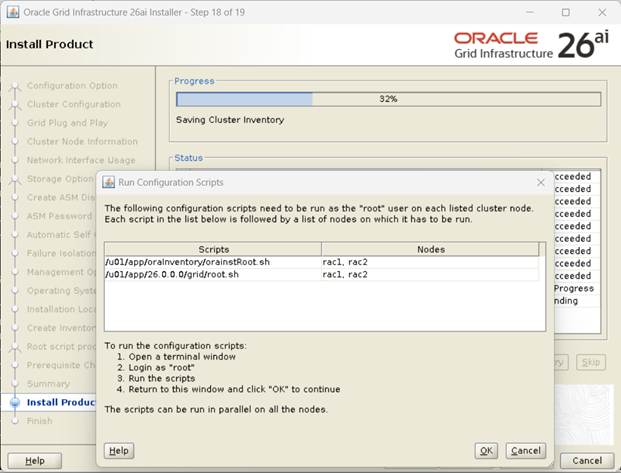
[화면의 내용대로 반드시 노드별 순서대로 스크립트 실행]
orainstRoot.sh 수행 (모든 노드 수행)
root@rac1:/root# /u01/app/oraInventory/orainstRoot.sh
root@rac1:/root# /u01/app/oraInventory/orainstRoot.sh
Changing permissions of /u01/app/oraInventory.
Adding read,write permissions for group.
Removing read,write,execute permissions for world.
Changing groupname of /u01/app/oraInventory to dba.
The execution of the script is complete.
2번노드에서 수행
root@rac2:/root# /u01/app/oraInventory/orainstRoot.sh
Changing permissions of /u01/app/oraInventory.
Adding read,write permissions for group.
Removing read,write,execute permissions for world.
Changing groupname of /u01/app/oraInventory to dba.
The execution of the script is complete.
1번노드에서 수행
root@rac1:/root# /u01/app/26.0.0.0/grid/root.sh
Performing root user operation.
The following environment variables are set as:
ORACLE_OWNER= oracle
ORACLE_HOME= /u01/app/26.0.0.0/grid
Enter the full pathname of the local bin directory: [/usr/local/bin]:
Copying dbhome to /usr/local/bin ...
Copying oraenv to /usr/local/bin ...
Copying coraenv to /usr/local/bin ...
Creating /etc/oratab file...
Entries will be added to the /etc/oratab file as needed by
Database Configuration Assistant when a database is created
Finished running generic part of root script.
Now product-specific root actions will be performed.
RAC option enabled on: Linux
Executing command '/u01/app/26.0.0.0/grid/perl/bin/perl -I/u01/app/26.0.0.0/grid/perl/lib -I/u01/app/26.0.0.0/g
rid/crs/install /u01/app/26.0.0.0/grid/crs/install/rootcrs.pl '
Using configuration parameter file: /u01/app/26.0.0.0/grid/crs/install/crsconfig_params
The log of current session can be found at:
/u01/app/oracle/crsdata/rac1/crsconfig/rootcrs_rac1_2026-02-11_10-06-08AM.log
2026/02/11 10:06:32 CLSRSC-594: Executing installation step 1 of 18: 'ValidateEnv'.
2026/02/11 10:06:33 CLSRSC-594: Executing installation step 2 of 18: 'CheckRootCert'.
2026/02/11 10:06:35 CLSRSC-594: Executing installation step 3 of 18: 'GenSiteGUIDs'.
2026/02/11 10:06:41 CLSRSC-594: Executing installation step 4 of 18: 'SetupOSD'.
Redirecting to /bin/systemctl restart rsyslog.service
2026/02/11 10:06:42 CLSRSC-594: Executing installation step 5 of 18: 'CheckCRSConfig'.
2026/02/11 10:06:43 CLSRSC-594: Executing installation step 6 of 18: 'SetupLocalGPNP'.
2026/02/11 10:06:59 CLSRSC-594: Executing installation step 7 of 18: 'CreateRootCert'.
2026/02/11 10:08:03 CLSRSC-594: Executing installation step 8 of 18: 'ConfigOLR'.
2026/02/11 10:08:19 CLSRSC-594: Executing installation step 9 of 18: 'ConfigCHMOS'.
2026/02/11 10:08:19 CLSRSC-594: Executing installation step 10 of 18: 'CreateOHASD'.
2026/02/11 10:08:25 CLSRSC-594: Executing installation step 11 of 18: 'ConfigOHASD'.
2026/02/11 10:08:26 CLSRSC-330: Adding Clusterware entries to file 'oracle-ohasd.service'
2026/02/11 10:09:14 CLSRSC-594: Executing installation step 12 of 18: 'SetupTFA'.
2026/02/11 10:09:14 CLSRSC-594: Executing installation step 13 of 18: 'InstallACFS'.
2026/02/11 10:09:24 CLSRSC-594: Executing installation step 14 of 18: 'CheckFirstNode'.
2026/02/11 10:09:26 CLSRSC-594: Executing installation step 15 of 18: 'InitConfig'.
CRS-4256: Updating the profile
Successful addition of voting disk 9825c0f770b84ffbbf00bd66c511c66c.
Successful addition of voting disk 74f5c96e28ca4f48bf9942e625f44896.
Successful addition of voting disk bec673e8fb9f4f8ebf6158d02ba06e4d.
Successfully replaced voting disk group with +VOTE.
CRS-4256: Updating the profile
CRS-4266: Voting file(s) successfully replaced
## STATE File Universal Id File Name Disk group
-- ----- ----------------- --------- ---------
1. ONLINE 9825c0f770b84ffbbf00bd66c511c66c (/dev/VOTE01) [VOTE]
2. ONLINE 74f5c96e28ca4f48bf9942e625f44896 (/dev/VOTE02) [VOTE]
3. ONLINE bec673e8fb9f4f8ebf6158d02ba06e4d (/dev/VOTE03) [VOTE]
Located 3 voting disk(s).
2026/02/11 10:15:10 CLSRSC-4002: Successfully installed Oracle Autonomous Health Framework (AHF).
2026/02/11 10:16:44 CLSRSC-594: Executing installation step 16 of 18: 'StartCluster'.
2026/02/11 10:17:46 CLSRSC-343: Successfully started Oracle Clusterware stack
2026/02/11 10:18:02 CLSRSC-594: Executing installation step 17 of 18: 'ConfigNode'.
clscfg: EXISTING configuration version 23 detected.
Successfully accumulated necessary OCR keys.
Creating OCR keys for user 'root', privgrp 'root'..
Operation successful.
2026/02/11 10:20:49 CLSRSC-594: Executing installation step 18 of 18: 'PostConfig'.
2026/02/11 10:22:30 CLSRSC-325: Configure Oracle Grid Infrastructure for a Cluster ... succeeded
2번노드에서 수행
root@rac2:/root# /u01/app/26.0.0.0/grid/root.sh
Performing root user operation.
The following environment variables are set as:
ORACLE_OWNER= oracle
ORACLE_HOME= /u01/app/26.0.0.0/grid
Enter the full pathname of the local bin directory: [/usr/local/bin]:
Copying dbhome to /usr/local/bin ...
Copying oraenv to /usr/local/bin ...
Copying coraenv to /usr/local/bin ...
Creating /etc/oratab file...
Entries will be added to the /etc/oratab file as needed by
Database Configuration Assistant when a database is created
Finished running generic part of root script.
Now product-specific root actions will be performed.
RAC option enabled on: Linux
Executing command '/u01/app/26.0.0.0/grid/perl/bin/perl -I/u01/app/26.0.0.0/grid/perl/lib -I/u01/app/26.0.0.0/g
rid/crs/install /u01/app/26.0.0.0/grid/crs/install/rootcrs.pl '
Using configuration parameter file: /u01/app/26.0.0.0/grid/crs/install/crsconfig_params
The log of current session can be found at:
/u01/app/oracle/crsdata/rac2/crsconfig/rootcrs_rac2_2026-02-11_10-24-05AM.log
2026/02/11 10:24:39 CLSRSC-594: Executing installation step 1 of 18: 'ValidateEnv'.
2026/02/11 10:24:40 CLSRSC-594: Executing installation step 2 of 18: 'CheckRootCert'.
2026/02/11 10:24:42 CLSRSC-594: Executing installation step 3 of 18: 'GenSiteGUIDs'.
2026/02/11 10:24:42 CLSRSC-594: Executing installation step 4 of 18: 'SetupOSD'.
Redirecting to /bin/systemctl restart rsyslog.service
2026/02/11 10:24:43 CLSRSC-594: Executing installation step 5 of 18: 'CheckCRSConfig'.
2026/02/11 10:24:45 CLSRSC-594: Executing installation step 6 of 18: 'SetupLocalGPNP'.
2026/02/11 10:24:45 CLSRSC-594: Executing installation step 7 of 18: 'CreateRootCert'.
2026/02/11 10:24:46 CLSRSC-594: Executing installation step 8 of 18: 'ConfigOLR'.
2026/02/11 10:25:08 CLSRSC-594: Executing installation step 9 of 18: 'ConfigCHMOS'.
2026/02/11 10:25:08 CLSRSC-594: Executing installation step 10 of 18: 'CreateOHASD'.
2026/02/11 10:25:13 CLSRSC-594: Executing installation step 11 of 18: 'ConfigOHASD'.
2026/02/11 10:25:14 CLSRSC-330: Adding Clusterware entries to file 'oracle-ohasd.service'
2026/02/11 10:26:00 CLSRSC-594: Executing installation step 12 of 18: 'SetupTFA'.
2026/02/11 10:26:00 CLSRSC-594: Executing installation step 13 of 18: 'InstallACFS'.
2026/02/11 10:26:09 CLSRSC-594: Executing installation step 14 of 18: 'CheckFirstNode'.
2026/02/11 10:26:12 CLSRSC-594: Executing installation step 15 of 18: 'InitConfig'.
2026/02/11 10:26:56 CLSRSC-594: Executing installation step 16 of 18: 'StartCluster'.
2026/02/11 10:28:08 CLSRSC-343: Successfully started Oracle Clusterware stack
2026/02/11 10:28:09 CLSRSC-594: Executing installation step 17 of 18: 'ConfigNode'.
2026/02/11 10:28:09 CLSRSC-594: Executing installation step 18 of 18: 'PostConfig'.
2026/02/11 10:28:41 CLSRSC-325: Configure Oracle Grid Infrastructure for a Cluster ... succeeded
양 노드에서 root.sh가 완료되어 OK 하면 후속작업이 진행되고 완료된다.
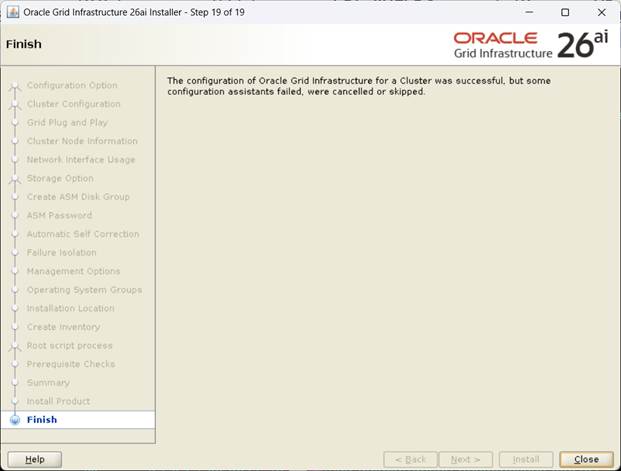
[설치완료, Close]
- crs 상태확인
| root@rac1:/root# crsctl stat res -t -------------------------------------------------------------------------------- Name Target State Server State details -------------------------------------------------------------------------------- Local Resources -------------------------------------------------------------------------------- ora.LISTENER.lsnr ONLINE ONLINE rac1 STABLE ONLINE ONLINE rac2 STABLE ora.chad ONLINE ONLINE rac1 STABLE ONLINE ONLINE rac2 STABLE ora.helper OFFLINE OFFLINE rac1 STABLE OFFLINE OFFLINE rac2 IDLE,STABLE ora.net1.network ONLINE ONLINE rac1 STABLE ONLINE ONLINE rac2 STABLE ora.ons ONLINE ONLINE rac1 STABLE ONLINE ONLINE rac2 STABLE -------------------------------------------------------------------------------- Cluster Resources -------------------------------------------------------------------------------- ora.ASMNET1LSNR_ASM.lsnr(ora.asmgroup) 1 ONLINE ONLINE rac1 STABLE 2 ONLINE ONLINE rac2 STABLE ora.LISTENER_SCAN1.lsnr 1 ONLINE ONLINE rac1 STABLE ora.VOTE.dg(ora.asmgroup) 1 ONLINE ONLINE rac1 STABLE 2 ONLINE ONLINE rac2 STABLE ora.asm(ora.asmgroup) 1 ONLINE ONLINE rac1 Started,STABLE 2 ONLINE ONLINE rac2 Started,STABLE ora.asmnet1.asmnetwork(ora.asmgroup) 1 ONLINE ONLINE rac1 STABLE 2 ONLINE ONLINE rac2 STABLE ora.cdp1.cdp 1 OFFLINE OFFLINE STABLE ora.cvu 1 ONLINE ONLINE rac1 STABLE ora.cvuhelper 1 ONLINE ONLINE rac2 STABLE ora.rac1.vip 1 ONLINE ONLINE rac1 STABLE ora.rac2.vip 1 ONLINE ONLINE rac2 STABLE ora.rhpserver 1 OFFLINE OFFLINE STABLE ora.scan1.vip 1 ONLINE ONLINE rac1 STABLE -------------------------------------------------------------------------------- root@rac1:/root# crsctl stat res -t -init -------------------------------------------------------------------------------- Name Target State Server State details -------------------------------------------------------------------------------- Cluster Resources -------------------------------------------------------------------------------- ora.asm 1 ONLINE ONLINE rac1 Started,STABLE ora.cluster_interconnect.haip 1 ONLINE ONLINE rac1 STABLE ora.crf 1 ONLINE ONLINE rac1 STABLE ora.crsd 1 ONLINE ONLINE rac1 STABLE ora.cssd 1 ONLINE ONLINE rac1 STABLE ora.cssdmonitor 1 ONLINE ONLINE rac1 STABLE ora.diskmon 1 OFFLINE OFFLINE STABLE ora.evmd 1 ONLINE ONLINE rac1 STABLE ora.gipcd 1 ONLINE ONLINE rac1 STABLE ora.gpnpd 1 ONLINE ONLINE rac1 STABLE ora.mdnsd 1 ONLINE ONLINE rac1 STABLE ora.storage 1 ONLINE ONLINE rac1 STABLE -------------------------------------------------------------------------------- |
1.1.2. ASMCA 이용 추가 Diskgroup 생성
- Diskgroup 생성전 asm_diskstring 추가작업
root@rac1:/# su - oracle
[CDB1]oracle@rac1:/home/oracle# . oraenv
ORACLE_SID = [CDB1] ? +ASM1
ORACLE_HOME = [/home/oracle] ? /u01/app/26.0.0.0/grid
The Oracle base remains unchanged with value /u01/app/oracle
[+ASM1]oracle@rac1:/home/oracle# sa
SQL*Plus: Release 23.26.1.0.0 - Production on Wed Feb 11 11:30:43 2026
Version 23.26.1.0.0
Copyright (c) 1982, 2025, Oracle. All rights reserved.
Connected to:
Oracle AI Database 26ai Enterprise Edition Release 23.26.1.0.0 - Production
Version 23.26.1.0.0
SQL> alter system set asm_diskstring='/dev/VOTE*','/dev/DATA*','/dev/RECO*';
System altered.
export DISPLAY=작업PC IP:0.0
./asmca

[왼쪽메뉴 Disk Groups 선택, Create Click]
[DATA 디스크 그룹지정, External 선택후 OK]
[RECO 디스크 그룹지정, External 선택후 OK]
[생성된 Diskgroup 확인후 Exit]
1.1.3. Database S/W 설치
- 디렉토리사전 생성
mkdir -p /u01/app/oracle/product/26.0.0.0/dbhome_1
chown -R oracle:dba /u01
chmod -R 755 /u01
1. 설치파일을 FTP로 해당서버에upload
LINUX.X64_2326100_db_home (Size 2.2G)
2. 설치이미지 압축해제 (반드시 $ORACLE_HOME 밑에 압축해제 해야 함)
unzip -qq LINUX.X64_2326100_db_home -d $ORACLE_HOME
3. runInstaller실행
xhost +
su – oracle
export DISPLAY=작업PC IP:0.0
cd $ORACLE_HOME
./runInstaller 실행

[Set Up Software Only 지정 후, Next]

[Oralcle Real Application Clusters 선태후 Next]

[노드 지정후, Next]

[Oracle base 지정 후, Next]
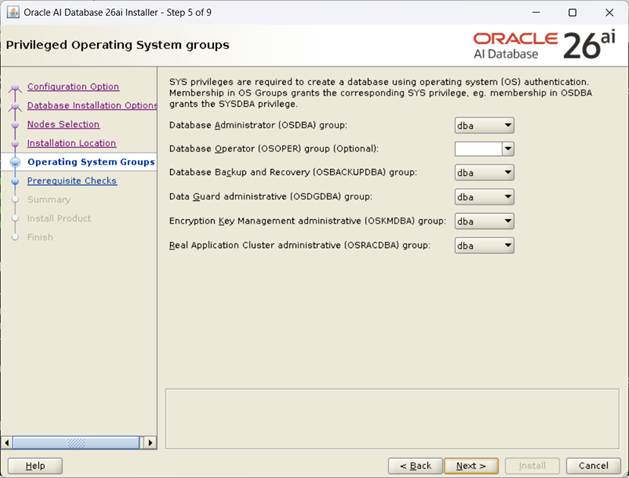
[그룹 지정 후, Next]
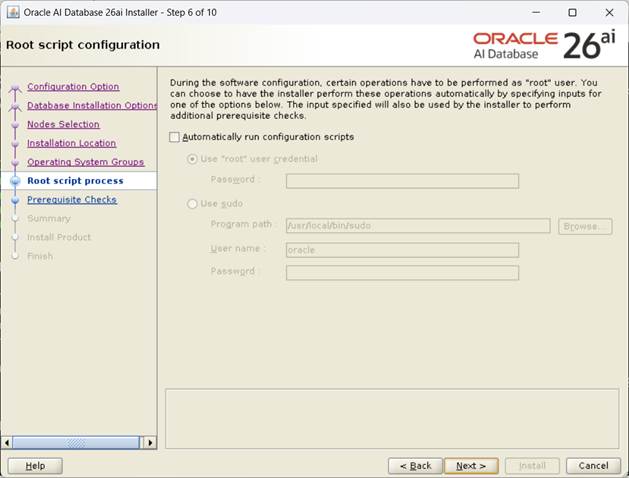
[Automatically run configuration scripts 선택하지 않는다, Next]
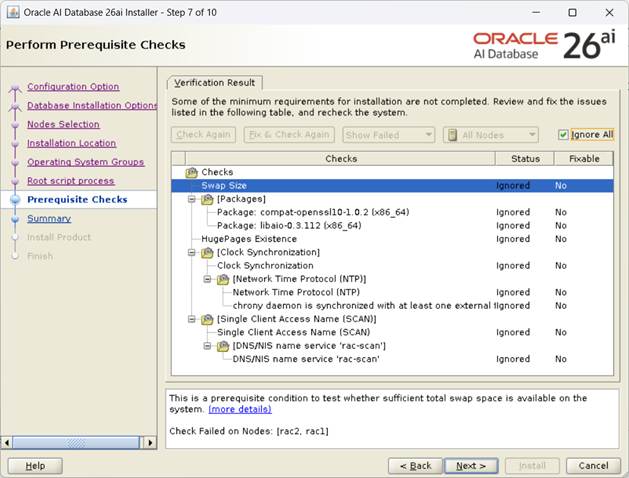
[Ignore all 체크후, Next]
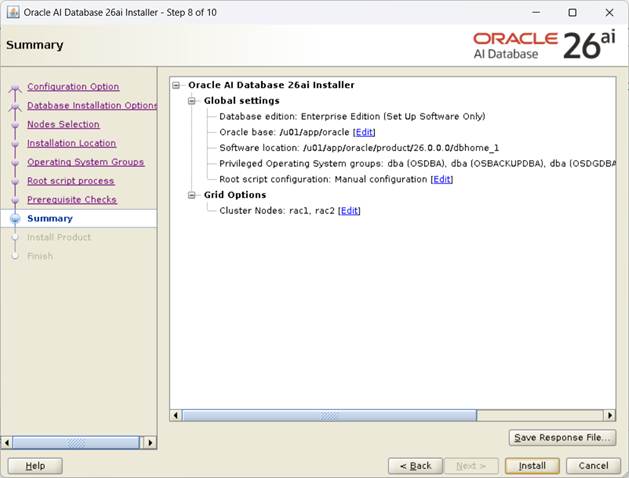
[Summary 확인후, Install]

[설치 진행이 완료되면 화면의 script 를 순서대로 실행]
root@rac2:/root# /u01/app/oraInventory/orainstRoot.sh
Changing permissions of /u01/app/oraInventory.
Adding read,write permissions for group.
Removing read,write,execute permissions for world.
Changing groupname of /u01/app/oraInventory to dba.
The execution of the script is complete.
root@rac1:/root# /u01/app/oracle/product/26.0.0.0/dbhome_1/root.sh
Performing root user operation.
The following environment variables are set as:
ORACLE_OWNER= oracle
ORACLE_HOME= /u01/app/oracle/product/26.0.0.0/dbhome_1
Enter the full pathname of the local bin directory: [/usr/local/bin]:
The contents of "dbhome" have not changed. No need to overwrite.
The contents of "oraenv" have not changed. No need to overwrite.
The contents of "coraenv" have not changed. No need to overwrite.
Entries will be added to the /etc/oratab file as needed by
Database Configuration Assistant when a database is created
Finished running generic part of root script.
Now product-specific root actions will be performed.
root@rac2:/root# /u01/app/oracle/product/26.0.0.0/dbhome_1/root.sh
Performing root user operation.
The following environment variables are set as:
ORACLE_OWNER= oracle
ORACLE_HOME= /u01/app/oracle/product/26.0.0.0/dbhome_1
Enter the full pathname of the local bin directory: [/usr/local/bin]:
The contents of "dbhome" have not changed. No need to overwrite.
The contents of "oraenv" have not changed. No need to overwrite.
The contents of "coraenv" have not changed. No need to overwrite.
Entries will be added to the /etc/oratab file as needed by
Database Configuration Assistant when a database is created
Finished running generic part of root script.
Now product-specific root actions will be performed.
2번도 동일하게 수행후 OK

[Database S/W 설치완료]
1.1.4. Netca 이용 리스너 생성
GRID 설치시 구성되어 있으므로 생략
1.1.5. DBA 이용 Database 생성
export DISPLAY=작업PC IP:0.0
cd $ORACLE_HOME/bin
./dbca

[Create Database 선택 후, Next]

[Advanced configuration선택 후, Next]
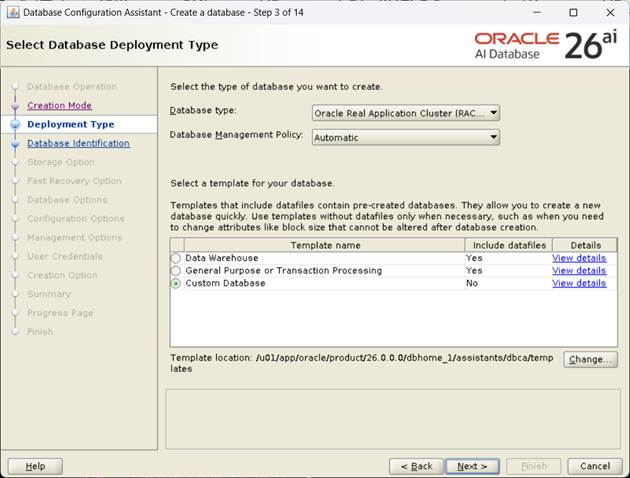
[Custom Database 선택 후, Next]

[노드 지정 후, Next]

[Global Name, SID 지정, PDB 이름 지정 후, Next]
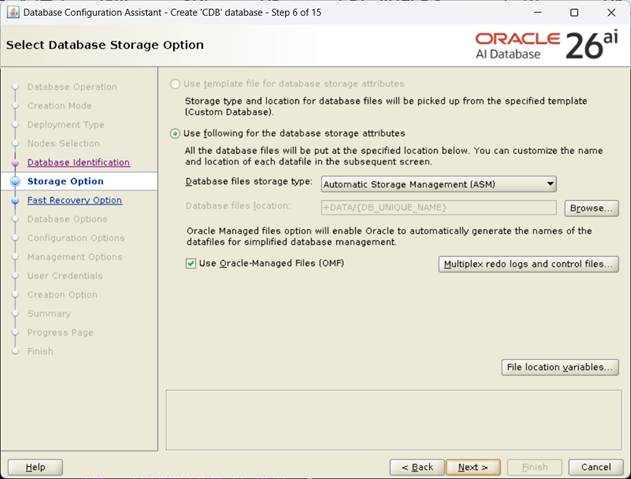
[Datafile 저장경로 설정 후, Next]

[Fast Recovery Area / 아카이브 경로 설정, Next]
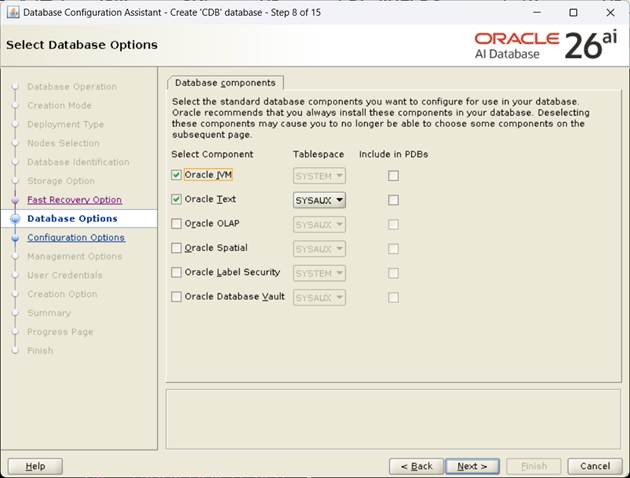
[설치할 component 확인 후, Next]

[Character sets 확인 후, Next]
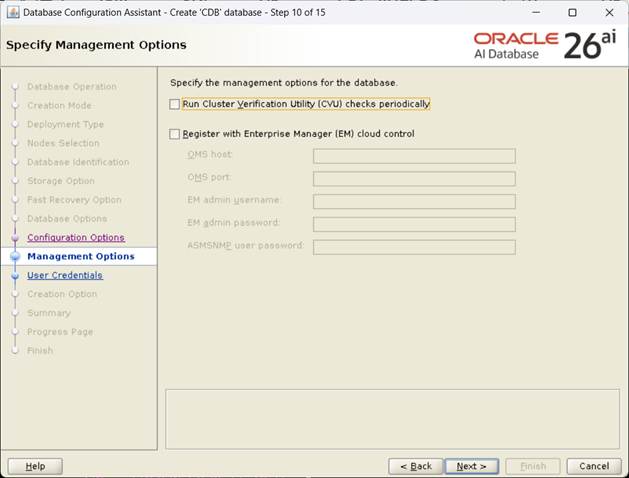
[EM Uncheck 후, Next]

[SYS, SYSTEM password 설정 후, Next]
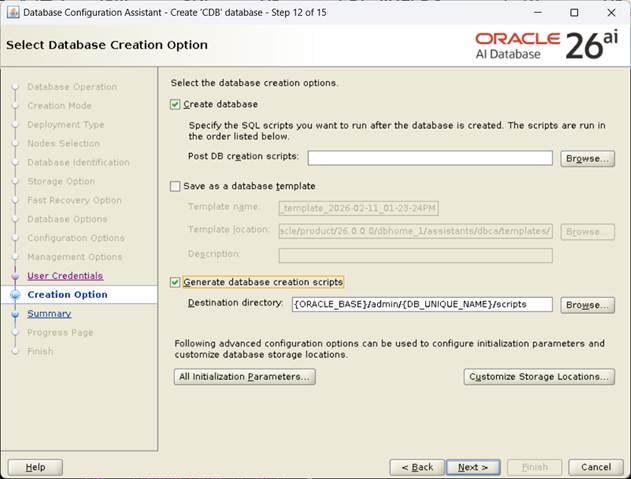
[Generate database creation scripts Check후, Next]
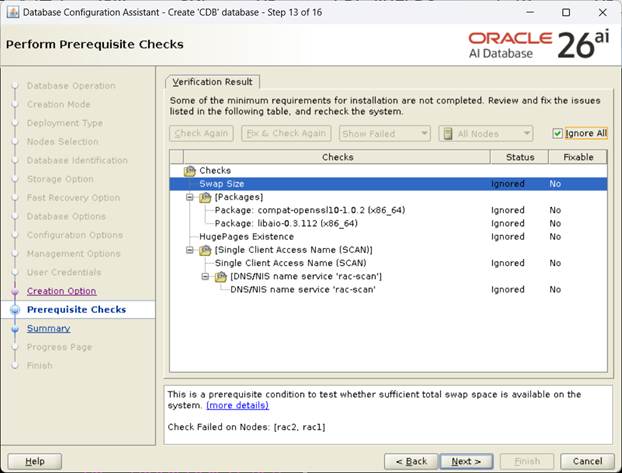
[Prerequisite Check 진행, Ignore All 선택후, Next]
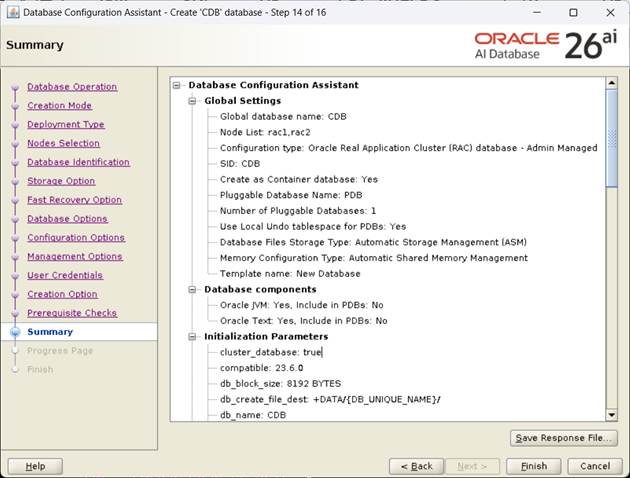
[Summary 확인후, Finish]

[DB 생성 진행, Finish]
1번
root@rac1:/root# crsctl stat res -t
--------------------------------------------------------------------------------
Name Target State Server State details
--------------------------------------------------------------------------------
Local Resources
--------------------------------------------------------------------------------
ora.LISTENER.lsnr
ONLINE ONLINE rac1 STABLE
ONLINE ONLINE rac2 STABLE
ora.chad
ONLINE ONLINE rac1 STABLE
ONLINE ONLINE rac2 STABLE
ora.helper
OFFLINE OFFLINE rac1 IDLE,STABLE
OFFLINE OFFLINE rac2 IDLE,STABLE
ora.net1.network
ONLINE ONLINE rac1 STABLE
ONLINE ONLINE rac2 STABLE
ora.ons
ONLINE ONLINE rac1 STABLE
ONLINE ONLINE rac2 STABLE
--------------------------------------------------------------------------------
Cluster Resources
--------------------------------------------------------------------------------
ora.ASMNET1LSNR_ASM.lsnr(ora.asmgroup)
1 ONLINE ONLINE rac1 STABLE
2 ONLINE ONLINE rac2 STABLE
ora.DATA.dg(ora.asmgroup)
1 ONLINE ONLINE rac1 STABLE
2 ONLINE ONLINE rac2 STABLE
ora.LISTENER_SCAN1.lsnr
1 ONLINE ONLINE rac2 STABLE
ora.RECO.dg(ora.asmgroup)
1 ONLINE ONLINE rac1 STABLE
2 ONLINE ONLINE rac2 STABLE
ora.VOTE.dg(ora.asmgroup)
1 ONLINE ONLINE rac1 STABLE
2 ONLINE ONLINE rac2 STABLE
ora.asm(ora.asmgroup)
1 ONLINE ONLINE rac1 Started,STABLE
2 ONLINE ONLINE rac2 Started,STABLE
ora.asmnet1.asmnetwork(ora.asmgroup)
1 ONLINE ONLINE rac1 STABLE
2 ONLINE ONLINE rac2 STABLE
ora.cdb.cdb_pdb.svc
1 ONLINE OFFLINE STABLE
2 ONLINE ONLINE rac2 STABLE
ora.cdb.db
1 ONLINE ONLINE rac1 Open,HOME=/u01/app/o
racle/product/26.0.0
.0/dbhome_1,STABLE
2 ONLINE ONLINE rac2 Open,HOME=/u01/app/o
racle/product/26.0.0
.0/dbhome_1,STABLE
ora.cdb.pdb.pdb
2 ONLINE ONLINE rac1 READ WRITE,STABLE
2 ONLINE ONLINE rac2 READ WRITE,STABLE
ora.cdp1.cdp
1 OFFLINE OFFLINE STABLE
ora.cvu
1 ONLINE ONLINE rac2 STABLE
ora.cvuhelper
1 ONLINE ONLINE rac2 STABLE
ora.rac1.vip
1 ONLINE ONLINE rac1 STABLE
ora.rac2.vip
1 ONLINE ONLINE rac2 STABLE
ora.rhpserver
1 OFFLINE OFFLINE STABLE
ora.scan1.vip
1 ONLINE ONLINE rac2 STABLE
--------------------------------------------------------------------------------