This is a ‘living’ glossary for the Oracle Optimizer I’ve put together for quick reference. It’s derived from the glossary in the SQL Tuning Guide with some additions and extra links.
ACS allows the Oracle Database to generate multiple execution plans for a single SQL statement using bind variables, based on the runtime bind values and their selectivity.
Cursor states:
Bind-insensitive: The plan is good for all bind values.
Bind-sensitive: Oracle starts monitoring behavior with different bind values.
Bind-aware: Oracle creates and uses different plans based on observed bind value selectivity.
The performance view V$SQL has columns IS_BIND_AWARE and IS_BIND_SENSITIVE for viewing cursor states associated with ACS.
Example:
SELECT * FROM orders WHERE customer_id = :b1;
If “:b1” is often a very selective value (few rows) but sometimes not (many rows), ACS can keep both a “selective” plan (index access) and a “non-selective” plan (full scan).
Useful view: V$SQL, columns IS_BIND_AWARE and IS_BIND_SENSITIVE
A feature of the adaptive optimizer that enables the automatic adjustment of the dynamic statistics level. It is associated with optimizer adaptive statistics and dynamic sampling level 11 (set using the OPTIMIZER_DYNAMIC_SAMPLING database parameter).
Adaptive plans (or optimizer adaptive plans) enable the optimizer to make a plan decision for a SQL statement after parsing has completed and during execution. This enables the optimizer to correct some classes of problems at runtime:
Adaptive statistics (or optimizer adaptive statistics) are a set of capabilities within the adaptive query optimisation framework that allow the optimizer to make run-time adjustments to execution plans and discover additional information that can lead to better statistics.
The feature makes use of SQL plan directives, statistics feedback, and adaptive dynamic sampling.
The capability is controlled by the optimizer_adaptive_statistics database parameter and is disabled by default in Oracle Database 12c Release 2 and onwards using the database parameter OPTIMIZER_ADAPTIVE_STATISTICS.
A bind-sensitive cursor that is eligible to use different plans for different bind values. After a cursor has been made bind-aware, the optimizer chooses plans for future executions based on the bind value and its cardinality estimate.
Example:
SELECT * FROM sales WHERE region_id = :r;
After several executions with varying selectivity for the values of “:r”, the cursor becomes bind-aware and, for small regions, uses an index access plan for the region_id column and, for large regions, uses a full table scan to access the SALES table.
A cursor whose optimal plan may depend on the value of a bind variable. The database monitors the behavior of a bind-sensitive cursor that uses different bind values to determine whether a different plan is beneficial. A bind-sensitive cursor may become bind-aware after a few executions.
Example:
SELECT * FROM accounts WHERE acct_type = :t;
Different selectivities for the value of “:t” lead Oracle to monitor and possibly create separate plans.
The ability of the optimizer to look at the value in a bind variable during a hard parse. By peeking at bind values, the optimizer can determine the selectivity of a WHERE clause condition as if literals had been used, thereby improving the plan. It works in concert with adaptive cursor sharing.
Example:
SELECT * FROM customers WHERE cust_type = :b;
First execution sees :b = ‘VIP’, very selective, yielding an index plan. Later executions with non-selective values may prompt ACS to add a second plan.
The primary optimization approach used by the Oracle Database. It is a strategy for choosing the most efficient execution plan for a SQL statement, largely based on optimizer statistics and estimated cost.
Example:
For a join of orders and customers, the optimizer weighs nested loops with index vs. hash join with full scans based on row counts and costs.
The legacy name for the Oracle Optimizer. In earlier releases, the cost-based optimizer was an alternative to the rule-based optimizer (RBO). The CBO calculates the “cost” of various execution plans and chooses the one with the lowest cost. The cost is a relative measure based on estimated resource consumption (CPU, I/O).
Dynamic Sampling
Dynamic sampling, also referred to as dynamic statistics in Oracle Database 12c Release 1 (12.1) and later releases, is an optimisation technique where the database executes an internal SQL statement to scan a small random sample of a table’s blocks to estimate predicate selectivities, thus leading to more accurate cardinality estimates.
Dynamic Statistics
An optimization technique in which the database executes an internal (recursive) SQL statement to scan a small random sample of a table’s blocks to estimate predicate selectivities, thus leading to more accurate cardinality estimates.
The level that controls both when the database gathers dynamic statistics, and the size of the sample that the optimizer uses to gather the statistics. Set the dynamic statistics level using either the OPTIMIZER_DYNAMIC_SAMPLING initialization parameter or a statement hint (DYNAMIC_SAMPLING).
Directives embedded within a SQL statement that allow developers to influence the optimizer’s choices. While powerful, they should be used judiciously as they can override optimal behavior if not carefully considered.
The logical optimizer is part of the overall Oracle Optimizer.
The logical optimizer (also known as the query transformation phase) focuses on restructuring the SQL query to produce a logically equivalent query that might be more efficient to execute.
The overall process of choosing the most efficient means of executing a SQL statement.
Optimizer
Built-in database software that determines the most efficient way to execute a SQL statement by considering factors related to the objects referenced and the conditions specified in the statement.
Outline
A special type of optimizer hint that fully specifies an execution plan. Outline hints are used internally by Oracle to recreate a specific execution plan.
You can see a SQL statements’ outline using the “OUTLINE” keyword in DBMS_XPLAN format. For example:
SELECT FROM TABLE(DBMS_XPLAN.DISPLAY_CURSOR(format=>'typical +outline'));
Performance Feedback
This form of automatic re-optimization helps improve the degree of parallelism automatically chosen for repeated SQL statements. It is enabled with automatic degree of parallelism and is therefore activated when PARALLEL_DEGREE_POLICY is set to ADAPTIVE.
Physical Optimizer
The physical optimizer is part of the overall Oracle Optimizer.
The physical optimizer takes the transformed (logical) query and determines the best execution plan based on statistics, access paths, and available operations.
A PL/SQL function that returns multiple rows, one at a time or in batches. It can be invoked if used as an operand of the TABLE operator in the FROM list of a SELECT statement.
Example:
SELECT * FROM TABLE(stream_orders_fn(:batch_id));
Rows “stream” to the caller as they are produced.
Plan Generator
The part of the optimizer that tries different access paths, join methods, and join orders for a given query block to find the plan with the lowest cost.
Recursive SQL
Additional SQL statements that the database must issue to execute a SQL statement issued by a user. The generation of recursive SQL is known as a recursive call. For example, the database generates recursive calls when data dictionary information is not available in memory and so must be retrieved from disk.
SQL Plan Directive
Additional information and instructions that the optimizer can use to generate a more optimal plan. For example, a SQL plan directive might instruct the optimizer to collect missing statistics or gather dynamic statistics. They are visible in the DBA_SQL_PLAN_DIRECTIVES view.
A form of automatic re-optimization that automatically re-parses SQL to improve execution plans that have cardinality misestimates. The optimizer may estimate cardinalities incorrectly, particularly if a query has many complex predicates. Statistics feedback aims to address this by re-parsing and improving cardinality estimates iteratively. This allows the optimizer to react to inaccuracies in initial estimates.
The performance view V$SQL includes a column called IS_REOPTIMIZABLE to indicate the status of re-optimization. The view V$SQL_REOPTIMIZATION_HINTS contains additional information pertinent to the re-optimization process.
Costing and Optimization
Base Cardinality
For a table, base cardinality is the total number of rows in the table before any predicate filtering.
Example:
If an EMPLOYEES table has 100,000 rows, its base cardinality is 100,000.
Cardinality
The estimated number of rows that a particular operation (e.g., a filter, a join) will return. Accurate cardinality estimates are crucial for the optimizer to choose an optimal plan. In the explain plan below, the cardinality of all operations is 105.
A numeric internal measure that represents the estimated resource usage for an execution plan. The lower the cost, the more efficient the plan. In the explain plan below, the total cost of the SELECT statement (the line with Id = 0) is 2.
The mathematical model used by the optimizer to calculate the cost of an execution plan. It considers factors like I/O operations and CPU usage.
Density
A decimal number between 0 and 1 that measures the selectivity of a column. Values close to 1 indicate that the column is unselective, whereas values close to 0 indicate that this column is more selective.
For example, consider a table (TAB1) and a column (COL1) containing values 1 to 10 (with no NULL values). The density of COL1 is 1/10, which equals 0.1.
Estimator
The component of the optimizer that determines the overall cost of a given execution plan.
Expected Cardinality
For a table, the optimizer’s estimated number of rows the table has after all filter predicates have been applied.
Heuristic
A heuristic is a rule-based decision used by the optimizer to guide query optimization. The optimizer uses both heuristics and cost-based decisions to generate execution plans. Heuristics are generally applied before cost-based decisions are made.
Index Clustering Factor
A measure of row order in relation to an indexed value, such as employee last name. The more scattered the rows among the data blocks, the higher the clustering factor. When retrieving multiple rows from a table using an index, a low clustering factor means that fewer blocks from the table need to be visited to retrieve table column values than if the clustering factor is high.
Optimizer Environment
The totality of session settings that can affect execution plan generation, such as the work area size or optimizer settings (for example, the optimizer mode).
Example:
ALTER SESSION SET optimizer_mode=first_rows(10); can change which join methods or access paths are chosen.
The prioritization of resource usage by the optimizer. The OPTIMIZER_MODE initialization parameter can be used to set the goal ‘best throughput’ or ‘best response time’.
ALL_ROWS: Optimizes for the best throughput, aiming to retrieve all rows as quickly as possible. This is the default.
FIRST_ROWS and FIRST_ROWS(n): Optimizes for the best response time, aiming to retrieve the first ‘n’ rows as quickly as possible.
Selectivity
Selectivity refers to the fraction (or percentage) of rows from a table that are expected to match a query predicate (e.g., a WHERE clause condition).
For example:
SELECT * FROM employees WHERE dept_id= 10;
Suppose there are 1000 employees, and 100 are in department 10
Selectivity = 100 / 1000 = 0.1 (10%)
A formula for selectivity is:
selectivity = rows returned / base cardinality
Unselective
An informal term used when a relatively large fraction of rows are returned from a row set. A query becomes more unselective as the selectivity approaches 1.
For example, a query that returns 999,999 rows from a table with one million rows is unselective. A query of the same table that returns one row is selective.
Execution Plans
Accepted Plan
In the context of SQL plan management, a plan that is in a SQL plan baseline for a SQL statement and, thus, available for use by the optimizer.
In the context of a SQL statement, it is how the database retrieves data from a database. For example, a query using an index and a query using a full table scan use different access paths.
An execution plan that changes after optimization because run-time conditions indicate that optimizer estimates are inaccurate. An adaptive query plan has different built-in plan options. During the first execution, before a specific subplan becomes active, the optimizer makes a final decision about which option to use. The optimizer bases its choice on observations made during the execution up to this point. Thus, an adaptive query plan enables the final plan for a statement to differ from the default plan.
A combination of one or more expressions and logical operators that returns a value of TRUE, FALSE, or UNKNOWN.
Correlated Subquery
A type of subquery that depends on values from the outer query. Unlike a regular (non-correlated) subquery, it cannot be run independently because it refers to a column from the outer query’s row.
Example:
SELECT e.* FROM emp e WHERE e.salary > (SELECT AVG(salary) FROM emp WHERE deptno = e.deptno);
Cursor-duration Temporary Table
A temporary table instantiated during query execution that stores query results for the duration of a cursor. For complex operations such as WITH clause queries and star transformations, this optimization enhances the materialization of intermediate results from repetitively used subqueries. In this way, cursor-duration temporary tables improve performance and optimizes I/O.
Example:
A complex WITH query executed multiple times within a statement may be materialized into a cursor-duration temporary table to avoid recomputation.
Default Plan
For an adaptive query plan, it is the execution plan initially chosen by the optimizer using the statistics from the data dictionary. The default plan can differ from the final plan.
Dynamic Plan
If an adaptive query plan is deemed appropriate during optimization, multiple subplans may be chosen for a query. The final subplan used at run time depends on the statistics obtained by the optimizer statistics collector.
Execution Plan
The combination of steps used by the database to execute a SQL statement. Each step either retrieves rows of data physically from the database or prepares them for the session issuing the statement. It defines the order of operations, access paths, join methods, and other details. It is typically viewed using DBMS_XPLAN or SQL Monitor.
Execution Tree
A tree diagram that shows the flow of row sources from one step to another in an execution plan.
Explain Plan
A SQL utility (EXPLAIN PLAN FOR statement) that displays the execution plan for a given SQL statement without actually executing it.
Example:
EXPLAIN PLAN FOR SELECT * FROM emp WHERE empno = 10; SELECT * FROM TABLE(DBMS_XPLAN.DISPLAY);
A combination of one or more values, operators, and SQL functions that evaluates to a value. For example, the expression 2*2 evaluates to 4. In general, expressions assume the data type of their components.
A WHERE clause component that eliminates rows from a single object referenced in a SQL statement.
Example:
WHERE hire_date >= DATE '2024-01-01'
Final Plan
In an adaptive plan, the plan that executes to completion. The default plan can differ from the final plan.
Inline View
An inline view is a subquery that is placed within the FROM clause of a SELECT statement. It effectively creates a temporary, named result set that the outer query can then treat as a table. Inline views can also be created using the WITH clause, which can enhance readability and maintenance in complex queries.
Example:
SELECT * FROM ( SELECT deptno, AVG(sal) avg_sal FROM emp GROUP BY deptno) v WHERE v.avg_sal > 10000;
An optimization technique where the database automatically eliminates unnecessary partitions from a query’s execution plan. For example, accessing specific index segments or scanning relevant partitions based on a query’s filter conditions.
Static partition pruning can occur at parse time if the relevant partition or partitions can be determined during optimization. Otherwise, dynamic pruning is where specific partitions are identified at run time.
Example:
WHERE order_date BETWEEN DATE '2025-01-01' AND DATE '2025-01-31' On a monthly range-partitioned table, the database scans only the January 2025 partition.
A condition used to filter rows in a WHERE, JOIN, or HAVING clause.
Examples:
t1.cust_id = t2.cust_id (join predicate)
amount > 1000 (filter predicate)
Private Temporary Table
A memory-only temporary table whose data and metadata is session-private.
Query Block
A top-level SELECT statement, a subquery, or an unmerged view
Subplan
A portion of an adaptive plan that the optimizer can switch to as an alternative at run time. A subplan can consist of multiple operations in the plan. For example, the optimizer can treat a join method and the corresponding access path as one unit when determining whether to change the plan at run time.
SELECT * FROM emp WHERE deptno IN (SELECT deptno FROM dept WHERE location = 'BOSTON');
Subquery Factoring
Subquery factoring clauses are synonymous with WITH clauses in SQL statements. They are used to logically break up and simplify complex queries to make them reusable and easier to read.
Example:
WITH high_sal AS (SELECT empno FROM emp WHERE sal > 10000) SELECT * FROM emp e JOIN high_sal h ON e.empno = h.empno;
Uncorrelated Subquery
A type of subquery that does not depend on values from the outer query.
SELECT * FROM emp WHERE sal > (SELECT AVG(sal) FROM emp);
Optimizer Statistics
Column Group
A set of two or more columns for which Oracle maintains combined statistics to better estimate row counts (cardinality) and selectivity during query optimization.
Statistics about columns that the optimizer uses to determine optimal execution plans. Column statistics include the number of distinct column values, low value, high value, and number of nulls. They can be viewed in the ALL_TAB_COL_STATISTICS dictionary view.
Data Skew
Large variations in the data distribution of values in a column.
Range skew refers to a non-uniform distribution of data values across a column’s range. For example, a column may have a range of values from 1 to 1000, but could be missing values between 500 and 900. That would constitute range skew.
Value skew refers to the uneven frequency of specific values within a column. For example, a column may contain values 1 to 2, but one row with value 1 and 1000 rows with value 2. That would constitute value skew.
Histograms are used to characterize range and value skew.
A number that uniquely identifies a bucket in a histogram. In frequency and hybrid histograms, the endpoint number is the cumulative frequency of endpoints. In height-balanced histograms, the endpoint number is the bucket number.
In a hybrid histogram, the number of times the endpoint value is repeated for each endpoint (bucket) in the histogram. By using the repeat count, the optimizer can obtain accurate estimates for popular values.
The statistics collected for column groups and expressions are called extended statistics.
Fixed Object Statistics
Fixed object statistics are optimizer statistics gathered on fixed objects, which are dynamic performance tables and their associated indexes. These objects record current database activity and are owned by the user SYS. They can be gathered with DBMS_STATS.GATHER_FIXED_OBJECT_STATS.
Frequency Histogram
A type of histogram in which each distinct column value corresponds to a single bucket. An analogy is sorting coins: all pennies go in bucket 1, all nickels go in bucket 2, and so on.
An enhanced height-based histogram that stores the exact frequency of each endpoint in the sample, and ensures that a value is never stored in multiple buckets.
Statistics about indexes that the optimizer uses to determine whether to perform a full table scan or an index scan. Index statistics include B-tree levels, leaf block counts, the index clustering factor, distinct keys, and number of rows in the index. They can be seen in ALL_IND_STATISTICS.
Number of Distinct Values (NDV)
Count of unique values in a column. The NDV is important in generating cardinality estimates.
Non-popular Value
In a histogram, any value that does not span two or more endpoints. Any value that is not non-popular is a popular value.
Optimizer system statistics gathered when the database simulates a workload.
Workload system statistics are gathered while observing actual database workloads.
Example:
EXEC DBMS_STATS.GATHER_SYSTEM_STATS('NOWORKLOAD')
Optimizer Statistics
Statistics details about the database object used by the optimizer to select the best execution plan for each SQL statement. Categories include table statistics such as numbers of rows, index statistics such as B-tree levels, system statistics such as CPU and I/O performance, and column statistics such as number of nulls.
Metadata about the data in tables and indexes, including the number of rows, number of distinct values, average row length, and data distribution (histograms). Accurate and up-to-date statistics are critical for the CBO.
A tool that inspects statistics gathering practices, automatically diagnoses problems with these practices, and generates a report of findings and recommendations.
System-supplied standards by which Optimizer Statistics Advisor performs its checks.
Optimizer Statistics Collection
Optimizer statistics collection or gathering is the process of compiling statistics information on database objects. The database can collect these statistics automatically, or you can collect them manually by using the system-supplied DBMS_STATS package.
A row source inserted into an execution plan at key points to collect run-time statistics for use in adaptive plans. A statistics collector is only used if adaptive plans are enabled.
Supplemental statistics collected automatically during conventional DML operations. Note that they do not replace the need for gathered optimizer statistics.
Statistics about tables that the optimizer uses to determine table access cost, join cardinality, join order, and so on. Table statistics include row counts, block counts, empty blocks, average free space per block, number of chained rows, average row length, and staleness of the statistics on the table. They can be seen in the ALL_TAB_STATISTICS dictionary view.
Top Frequency Histogram
A variation of a frequency histogram that ignores non-popular values that are statistically insignificant, thus producing a better histogram for popular values
A SQL plan management feature that enables you to specify the eligibility criteria for automatic initial plan capture using DBMS_SPM.CONFIGURE. Used in conjunction with the database initialization parameter optimizer_capture_sql_plan_baselines.
The mechanism by which the database automatically creates a SQL plan baseline for any repeatable SQL statement executed on the database. Enable automatic initial plan capture by setting the optimizer_capture_sql_plan_baselines initialization parameter to true (the default is false).
Automatic SQL Plan Management
A feature that allows the Oracle database to capture SQL plan baselines automatically to prevent SQL plan performance regressions. Plan performance verification can be performed using a background task or in the foreground using real-time SPM.
The automatic SQL tuning set (ASTS or Auto STS) is a system-maintained SQL tuning set called SYS_AUTO_STS. It is used to capture workload SQL statements to support automatic features such as automatic indexing and automatic SQL plan management.
In the context of SQL plan management, a plan that a database administrator has manually marked as ineligible for use by the optimizer.
Example:
BEGIN DBMS_SPM.ALTER_SQL_PLAN_BASELINE(..., attribute_name=>'ENABLED', attribute_value=>'NO') END; /
Enabled Plan
In SQL plan management, a plan that is eligible for use by the optimizer.
Fixed Plan
An accepted plan that is marked as preferred, so that the optimizer considers only the fixed plans in the SQL plan baseline. You can use fixed plans to influence the plan selection process of the optimizer.
The attempt to find a matching plan in the SQL plan baseline for a statement after performing a hard parse. If no plan baseline matches, the optimizer uses the plan chosen by the optimizer.
Plan Stability
Ensuring that a SQL statement consistently uses the same execution plan (or an ‘approved’ execution plan) over time, even with changes in data or environment.
Plan Verification
Comparing the performance of an unaccepted plan to a plan in a SQL plan baseline.
Real-time SQL plan management
A subcomponent of automatic SQL plan management. It allows the Oracle database to capture SQL plan baselines automatically to prevent SQL plan performance regressions. Plan performance verification is performed in the foreground (client) process rather than in the background.
A repeatable SQL statement is one where its SQL signature does not change (i.e. the SQL text remains the same while making allowances for differences in white space and case), and the database hard parses more than once. SQL statements are tracked in the SQL statement log to monitor repeatability.
Example:
SELECT * FROM sales WHERE sale_id = :bind1;
SQL Handle
A string value derived from the numeric SQL signature. Like the signature, the handle uniquely identifies a SQL statement. It serves as a SQL search key in user APIs. SQL handles can be viewed in DBA_SQL_PLAN_BASELINES.
SQL Management Base (SMB)
A logical repository that stores statement logs, plan histories, SQL plan baselines, and SQL profiles. The SMB is part of the data dictionary and resides in the SYSAUX tablespace.
SQL Management Object (SMO)
A feature that stabilizes the execution plans of individual SQL statements. Examples include SQL profiles, SQL plan baselines, and SQL patches.
SQL Patch
A SQL Patch is a SQL management object that is used to change or fix the behavior of a SQL statement.
A SQL execution plan captured by SQL plan management but has not been ‘accepted’ (and thus added to the SQL plan baseline). It can be thought of as an ‘unaccepted SQL plan baseline’. They appear in the view DBA_SQL_PLAN_BASELINES where the ACCEPTED column has the value NO.
A set of one or more accepted plans for a repeatable SQL statement. Plan baselines allow the optimizer to capture known execution plans for a SQL statement and specify which plans can be used. In general, only “accepted” plans in the baseline can be used, ensuring plan stability and preventing regressed performance. Unaccepted plans listed in the database view DBA_SQL_PLAN_BASELINES are part of the SQL plan history rather than the SQL plan baseline.
Techniques for capturing and storing relevant information about plans in the SQL management base (SMB) for a set of SQL statements. Capturing a plan means making SQL plan management aware of this plan.
SQL plan management is a mechanism that records and evaluates the execution plans of SQL statements over time. SQL plan management can prevent SQL plan regressions caused by environmental changes such as a new optimizer version, changes to optimizer statistics, system settings, and so on.
The key features and components are:
SQL Plan Baseline: a set of one or more accepted execution plans for a specific SQL statement. Only these plans are eligible for use by the optimizer.
Plan Capture: the process of recording execution plans from the cursor cache or SQL tuning sets. Can be automatic or manual.
Plan Selection: the optimizer uses only enabled and accepted plans from the baseline. If no baseline exists, it proceeds with normal cost-based optimization.
Plan Evolution: the process of evaluating new plans and accepting them into the baseline only if they perform better. Evolution can be achieved automatically or manually.
A SQL management object create by the SQL Tuning Advisor that helps the optimizer generate better execution plans. It provides additional statistics and corrections that help the optimizer make better decisions.
SQL Signature
A numeric hash value computed using a SQL statement text that has been normalized for case insensitivity and white space. It uniquely identifies a SQL statement. The database uses this signature as a key to maintain SQL management objects such as SQL profiles, SQL plan baselines, and SQL patches. For example, the DBA_SQL_PLAN_BASELINES view includes a SIGNATURE column.
SQL Statement Log
When automatic SQL plan capture is enabled, a log that contains the SQL ID of SQL statements that the optimizer has evaluated over time. A statement is tracked when it exists in the log.
SQL Tuning Advisor
An automated tool that analyzes SQL statements and provides tuning recommendations to improve their performance. It may recommend the creation of a SQL profile to improve a SQL execution plan.
A deprecated feature for storing hints associated with a SQL statement, superseded by SQL plan management. The hints in stored outlines direct the optimizer to choose a specific plan for the statement.
Unaccepted Plan
A plan for a statement that is in the SQL plan history but has not been added to the SQL plan baseline.
Join Types and Join Methods
Antijoin
A join type that returns rows that fail to match the subquery on the right side. For example, an antijoin can list departments with no employees. Antijoins use the NOT EXISTS or NOT IN constructs.
Example:
SELECT d.deptno FROM dept d WHERE NOT EXISTS ( SELECT 1 FROM emp e WHERE e.deptno = d.deptno);
Band Join
A special type of non-equijoin join type in which key values in one data set must fall within the specified range (“band”) of the second data set. Typically, they are used in time-range correlations.
Example:
WHERE e.event_ts BETWEEN w.start_ts AND w.end_ts;
Bushy Join Tree
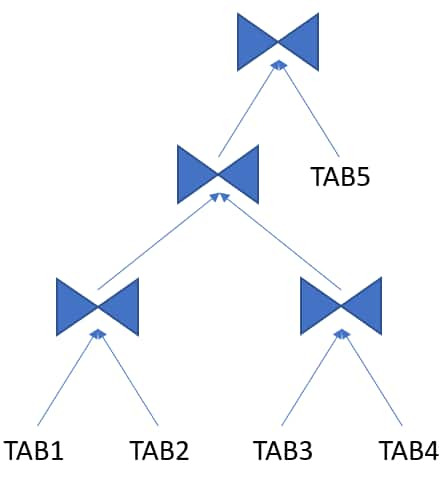
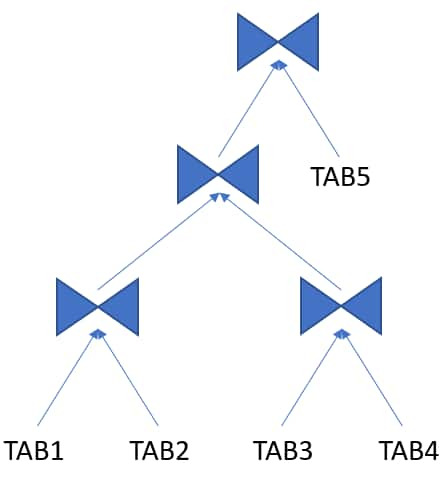
A join tree in which the left or the right child of an internal node can be a join node.
A join type that returns every combination of rows: a Cartesian join.
Example:
SELECT * FROM t1 CROSS JOIN t2;
Cartesian Join
A join type in which one or more of the tables does not have any join conditions to any other tables in the statement. The optimizer joins every row from one data source with every row from the other data source, creating the Cartesian product of the two sets.
Joins every row of one table to every row of the other (no join condition).
Typically used intentionally in special cases, but can otherwise indicate a missing join predicate in the SQL statement.
Example:
SELECT * FROM t1, t2;
Cartesian Product
A join type that returns every combination of rows from both tables in the join.
Driving Table
The table to which other tables are joined. An analogy from programming is a for loop that contains another for loop. The outer for loop is the analog of a driving table.
Equijoin
A join type whose join condition contains an equality operator.
Example:
SELECT t1.surname, t2.department_name FROM staff t1 JOIN departments t2 ON t1.deptno = t2.deptno;
Full Outer Join
A combination of a left and right outer join. In addition to the inner join, the database uses nulls to preserve rows from both tables that have not been returned in the result of the inner join. In other words, full outer joins join tables together, yet show rows with no corresponding rows in the joined tables.
Example:
SELECT … FROM t1 FULL OUTER JOIN t2 ON t1.id = t2.id;
Hash Join
A method for joining large data sets. The database uses the smaller of two data sets to build a hash table on the join key in memory. It then scans the larger data set, probing the hash table to find the joined rows.
Inner Join
A join type of two or more tables that returns only those rows that satisfy the join condition.
Inner Table
In a nested loops join, the table that is not the outer table (driving table). For every row in the outer table, the database accesses rows from the inner table.
Join
A statement that retrieves data from multiple tables specified in the FROM clause of a SQL statement. Join types include inner joins, outer joins, and Cartesian joins.
A condition that compares two row sources using an expression. The database combines rows from each row source, for which the join condition evaluates to true.
A user-created database object that specifies a group of columns that participate in a join. Join groups are only supported in the In-Memory column store.
Join Method
A method of joining a pair of row sources. For example, nested loop, sort merge, and hash joins.
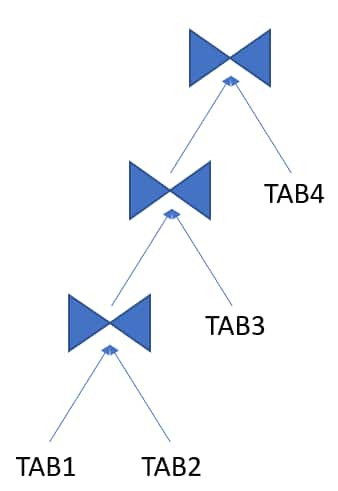
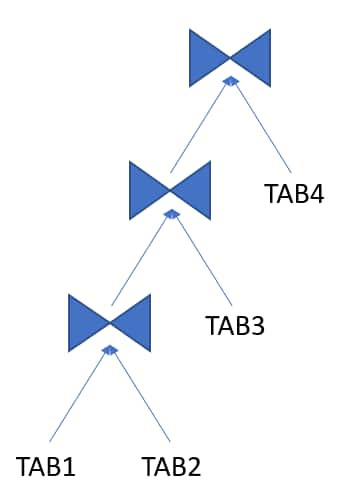
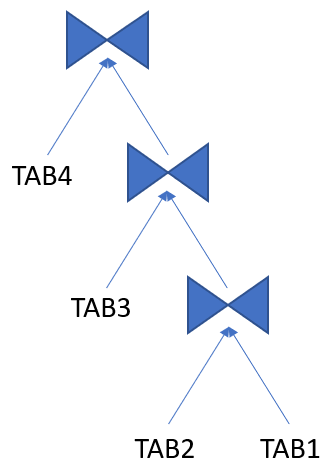
A join tree is also called a join graph or join order tree. It represents how multiple tables are joined together in a SQL query, and it implies a join order from the bottom to the top of the tree.
The order in which multiple tables are joined together. For example, for each row in the employees table, the database can read each row in the departments table. In an alternative join order, for each row in the departments table, the database reads each row in the employees table.
To execute a statement that joins more than two tables, Oracle joins two of the tables and then joins the resulting row source to the next table. This process continues until all tables are joined into the result.
The order in which tables are joined can significantly affect performance, so the optimizer aims to find the most efficient one.
A join type that includes all rows from the left table and matched rows from the right.
Left Table
In an outer join, the table specified on the left side of the OUTER JOIN keywords (in ANSI SQL syntax). Appears on the left in a join tree.
Nested Loops Join
A type of join method, best for joining a small number of rows. A nested loops join determines the outer table that drives the join, and for every row in the outer table, probes each row in the inner table. The outer loop is for each row in the outer table and the inner loop is for each row in the inner table. An analogy from programming is a for loop inside of another for loop.
Non-equijoin
A join type whose join condition does not contain an equality operator.
Example:
SELECT t1.surname, t2.department_name FROM staff t1 JOIN departments t2 ON t1.deptno <> t2.deptno;
Non-join Column
A predicate in a WHERE clause that references only one table.
Outer Join
A join type using the outer join operator (+) or ANSI OUTER JOIN syntax with one or more columns of one of the tables. The database returns all rows that meet the join condition, along with unmatched rows padded with NULL values.
A type of join that returns rows from one table where a match exists in another table but does not return any columns from the second (matched) table. It optimizes subqueries with IN or EXISTS.
A type of join method. The join consists of a sort join, in which both inputs are sorted on the join key, followed by a merge join, in which the sorted lists are merged.
Complex View Merging (CVM) is a transformation where complex views are merged into the outer query, where, traditionally, they could not be merged (due to constructs like GROUP BY, DISTINCT, HAVING, etc.).
It extends regular view merging to support more sophisticated views, enabling more powerful optimization strategies.
Expands OR conditions into UNION ALL or multiple branches for better index use. The decision to use the transformation is cost-based, in contrast to the legacy OR transformation, which used heuristics.
Expansion
An expansion duplicates a portion of a query, typically in OR conditions or set operations (such as UNION ALL), to optimize each part separately and combine the results.
Group-by Placement
When possible, the optimizer repositions GROUP BY clauses for early aggregation. It can be advantageous to group rows as soon as possible in the execution plan, reducing the number of rows processed in subsequent joins.
Join Commutation/Associativity
Allows the optimizer to reorder joins by commuting (swapping the left and right inputs of a join) and associating (regrouping chains of joins) so it can evaluate more join orders and choose the lowest-cost one.
Join Conversion
Converts outer joins to inner joins (or vice versa) when safe and beneficial.
Join Elimination
The removal of redundant tables from a query. A table is redundant when its columns are only referenced in join predicates, and those joins are guaranteed to neither filter nor expand the resulting rows.
For example, when joining to a primary key of a foreign key table, where only the key is referenced, can be eliminated.
Join Factorization
A cost-based transformation that can factorize common computations from branches of a UNION ALL query. Without join factorization, the optimizer evaluates each branch of a UNION ALL query independently, which leads to repetitive processing, including data access and joins. Avoiding an extra scan of a large base table can lead to huge performance improvements.
Join Predicate Pushdown (JPPD)
Join Predicate Pushdown (JPPD) in Oracle is a cost-based query transformation where join conditions (or related predicates) are pushed into a subquery/view so Oracle can filter rows earlier, reduce intermediate row counts, and sometimes enable better access paths (e.g., index range scans, partition pruning).
Example:
SELECT o.order_id, o.order_date FROM orders o JOIN ( SELECT customer_id FROM customers WHERE region = 'US' ) c ON c.customer_id = o.customer_id WHERE o.status = 'SHIPPED';
Can be transformed to:
SELECT o.order_id, o.order_date FROM orders o WHERE o.status = 'SHIPPED' AND EXISTS ( SELECT 1 FROM customers c WHERE c.region = 'US' AND c.customer_id = o.customer_id );
This helps when the inline view would otherwise return many rows (e.g., all US customers), but the driving table predicate (o.status=’SHIPPED’) is selective.
Predicate Pushing
A transformation technique in which the optimizer “pushes” the relevant predicates from the containing query block into the view query block. For views that are not merged, this technique improves the subplan of the unmerged view because the database can use the pushed-in predicates to access indexes or to use as filters.
An optimizer-generated view that appears in queries in which a DISTINCT view has been merged, or a GROUP BY view is merged into an outer query block that also contains GROUP BY, HAVING, or aggregates.
Query rewrite
An optimizer feature that automatically transforms a user’s query into a different but semantically equivalent query, typically to improve performance using materialized views.
The merging of select-project-join views. For example, a query joins the employees table to a subquery that joins the departments and locations tables.
Rewrites star-schema joins to bitmap index-based filtering for performance. It requires bitmap indexes on dimension keys, and the database star_transformation_enabled must be set to TRUE.
A transformation technique that enables the optimizer to generate a plan that uses indexes on the read-mostly portion of a partitioned table, but not on the active portion of the table.
The process by which the optimizer rewrites a SQL statement into an equivalent but more efficient form. Examples include view merging, subquery unnesting, and predicate pushdown.
A query transformation technique used by the optimizer to infer additional predicates based on existing ones.
For example, if A = B and B = C, then the optimizer can infer that A = C.
This inferred condition can then be used to optimize query performance, especially for join elimination, index usage, and partition pruning.
View Merging
The merging of a query block representing a view into the query block that contains it. View merging can improve plans by enabling the optimizer to consider additional join orders, access methods, and other transformations.
Merging a view into the main query allows the optimizer to treat the view as part of the outer query, enabling further optimizations.
View subsumption is a heuristic query transformation technique that aims to improve query performance by reducing multiple table accesses and joins. It achieves this by unifying computations in multiple views into a single inline view (where possible and safe).
Optimizing Data Processing and Access
Access Path
The method used by the Oracle Optimizer to retrieve data from tables. Common access paths include full table scans, index scans (unique, range, skip), and cluster scans.
A bitmap index for the join of two or more tables.
Bitmap Piece
A subcomponent of a single bitmap index entry. Each indexed column value may have one or more bitmap pieces. The database uses bitmap pieces to break up an index entry that is large in relation to the size of a block.
Approximate Query Processing
A set of optimization techniques that speed analytic queries by calculating results within an acceptable range of error.
A Bloom filter is a low-memory data structure used to test membership in a set. It can correctly indicate when an element is not in a set, but it may incorrectly indicate when an element is in a set; thus, false negatives are impossible, but false positives are possible. Bloom filters are particularly effective when the memory needed to store the filter is small relative to the data set size, and when most data is expected to fail the membership test.
An index organized like an upside-down tree. A B-tree index has two types of blocks: branch blocks for searching and leaf blocks that store values. The leaf blocks contain every indexed data value and a corresponding rowid used to locate the actual row. The “B” stands for “balanced” because all leaf blocks automatically stay at the same depth.
An access path for a table cluster. In an indexed table cluster, Oracle Database first obtains the rowid of one of the selected rows by scanning the cluster index. Oracle Database then locates the rows based on this rowid.
Direct Path Read
A performance optimization where a single or multiblock read is processed directly in the program global area (PGA – an area of memory local to the client process). It bypasses the system global area (SGA) to improve the efficiency of processing the database blocks.
A foreign key is a constraint that links two tables together by declaring or enforcing a relationship between a column (or group of columns) in one table and the primary key in another.
Full Table Scan
A scan of table data in which the database sequentially reads all rows from a table and filters out those that do not meet the selection criteria. All data blocks under the high water mark are scanned.
Used in cases where there is no usable index or where query predicates match a large proportion of rows in the table (or table partition).
A type of table cluster that is similar to an indexed cluster, except the index key is replaced with a hash function. No separate cluster index exists. In a hash cluster, the data is the index.
Hash Scan
An access path for a table cluster. The database uses a hash scan to locate rows in a hash cluster based on a hash value. In a hash cluster, all rows with the same hash value are stored in the same data block. To perform a hash scan, Oracle Database first obtains the hash value by applying a hash function to a cluster key value specified by the statement, and then scans the data blocks containing rows with that hash value.
An index range scan in which the database returns rows in descending order.
Index Skip Scan
An index scan occurs in which the initial column of a composite index is “skipped” or not specified in the query. For example, if the composite index key is (cust_gender,cust_email), then the query predicate does not reference the cust_gender column.
An I/O call that reads multiple database blocks. Multiblock reads can significantly speed up full table scans. For example, a data block might be 8 KB, but the operating system can read 1024 KB in a single I/O. For some queries, the optimizer may decide that it is more cost-efficient to read 128 data blocks in one I/O than in 128 sequential I/Os.
Parallel Execution
The application of multiple CPU and I/O resources to the execution of a single database operation.
A query in which multiple processes work together simultaneously to run a single SQL query. By dividing the work among multiple processes, Oracle Database can run the statement more quickly. For example, four processes retrieve rows for four different quarters in a year instead of one process handling all four quarters by itself.
Running portions of the query simultaneously to improve performance.
A column or combination of columns that uniquely identifies each row in a table. In Oracle, uniqueness is enforced using unique indexes.
Table Cluster
A schema object that contains data from one or more tables, all of which have one or more columns in common. In table clusters, the database stores together all the rows from all tables that share the same cluster key.
Unique index
A unique index is a type of index that enforces uniqueness on the indexed column (or columns).
General Terminology
Bind Variable
A placeholder in a SQL statement that must be replaced with a valid value or value address for the statement to execute successfully. By using bind variables, you can write a SQL statement that accepts inputs or parameters at run time. The following query uses v_empid as a bind variable:
SELECT * FROM employees WHERE employee_id = :v_empid;
Child Cursor
The cursor containing the plan, compilation environment, and other information for a statement whose text is stored in a parent cursor. The parent cursor is number 0, the first child is number 1, and so on. Child cursors reference the same SQL text as the parent cursor but are different. For example, two queries with the text “SELECT * FROM t” use different cursors when they reference two different tables named “t”.
A handle or name for a private SQL area in the program global area (PGA – a memory area local to the client process). Because cursors are closely associated with private SQL areas, the terms are sometimes used interchangeably.
Combining cursors to save space in the shared SQL area. It reduces child cursor proliferation when two child cursors share identical plans and metadata, thus reusing the same child.
Data Dictionary
A collection of tables and views that store metadata about the database, including information about tables, indexes, columns, and their statistics. The optimizer queries the data dictionary to gather information for plan generation.
Data Flow Operator (DFO)
The unit of work between data redistribution stages in a parallel query.
Degree of Parallelism (DOP)
The number of parallel execution servers associated with a single operation. Parallel execution is designed to effectively use multiple CPUs. Oracle Database parallel execution framework enables you to either explicitly choose a specific degree of parallelism or to rely on Oracle Database to automatically control it.
A view created on dynamic performance tables, which are virtual tables that record current database activity. The dynamic performance views are called fixed views because they cannot be altered or removed by the database administrator. They are also called V$ views because they begin with the string V$ (and GV$ in Oracle Real Application Clusters).
An optimizer capability that enables authors of user-defined functions and indexes to create statistics collection, selectivity, and cost functions that the optimizer uses when choosing an execution plan. The optimizer cost model is extended to integrate information supplied by the user to assess CPU and I/O cost.
External Table
A read-only table whose metadata is stored in the database but whose data is stored in files outside the database. The database uses the metadata describing external tables to expose their data as if they were relational tables.
A dynamic performance table or its index. The fixed objects are owned by SYS. Fixed object tables have names beginning with X$ and are the base tables for the V$ views.
Global Temporary Table (GTT)
A special temporary table that stores intermediate session-private data for a specific duration.
Hard Parse
The steps performed by the database to build a new executable version of application code. The database must perform a hard parse instead of a soft parse if the parsed representation of a submitted statement does not exist in the shared SQL area.
See also shared SQL area and soft parse.
Hash Collision
Hashing multiple input values to the same output value.
Hash Function
A function that operates on an arbitrary-length input value and returns a fixed-length hash value.
Hash Table
An in-memory data structure that associates join keys with rows in a hash join. For example, in a join of the employees and departments tables, the join key might be the department ID. A hash function uses the join key to generate a hash value. This hash value is an index in an array, which is the hash table.
Hash Value
In a hash cluster, a unique numeric ID that identifies a bucket. Oracle Database uses a hash function that accepts an infinite number of hash key values as input and sorts them into a finite number of buckets. Each hash value maps to the database block address for the block that stores the rows corresponding to the hash key value (department 10, 20, 30, and so on).
Hashing
A mathematical technique in which an infinite set of input values is mapped to a finite set of output values, called hash values. Hashing is useful for rapid lookups of data in a hash table.
Heap-organized Table
A table in which the data rows are stored in no particular order on storage. By default, CREATE TABLE creates a heap-organized table.
High Water Mark
A high watermark (HWM) is a marker that indicates the highest point (or block) in a segment (like a table, partition, or index) that has ever been used or allocated for data storage. HWM is not reduced by delete operations, but can be when using SHRINK SEGMENT and TRUNCATE commands.
Hybrid Hash Distribution Technique
An adaptive parallel data distribution that does not decide the final data distribution method until execution time.
Implicit Query
A component of a DML statement that retrieves data without a subquery. An UPDATE, DELETE, or MERGE statement that does not explicitly include a SELECT statement uses an implicit query to retrieve the rows to be modified.
In-Memory scan
A table scan that retrieves rows from the In-Memory Column Store (IM column store).
Key Vector
A data structure that maps between dense join keys and dense grouping keys.
Latch
A low-level serialization control mechanism used to protect shared data structures in the system global area from simultaneous access.
Library Cache
An area of memory in the shared pool. This cache includes the shared SQL areas, private SQL areas (in a shared server configuration), PL/SQL procedures and packages, and control structures such as locks and library cache handles.
The reuse of SQL statement code found in the library cache.
Library Cache Miss
During SQL processing, the act of searching for a usable plan in the library cache and not finding it.
Parent Cursor
The cursor that stores the SQL text and other minimal information for a SQL statement. The child cursor contains the plan, compilation environment, and other information. When a statement first executes, the database creates both a parent and child cursor in the shared pool.
Parse Call
A call to Oracle to prepare a SQL statement for execution. The call includes syntactically checking the SQL statement, optimizing it, and then building or locating an executable form of that statement.
Parsing
The process of breaking down a SQL statement into its constituent parts, checking its syntax and semantics, and then generating an execution plan.
A table that has been logically divided into smaller, more manageable pieces called partitions. These partitions can improve query performance, ease maintenance, and enhance manageability, especially with very large tables.
A partition-related operation such as adding, exchanging, merging, or splitting table partitions.
See also partitioned table.
Private SQL Area
An area in memory that holds a parsed statement and other information for processing. The private SQL area contains data such as bind variable values, query execution state information, and query execution work areas.
Proactive SQL Tuning
Using SQL tuning tools to identify SQL statements that are candidates for tuning before users have complained about a performance problem.
Query
An operation that retrieves data from tables or views. For example, SELECT * FROM employees is a query.
A set of rows returned by a step in an execution plan.
Row Source
An iterative control structure that processes a set of rows in an iterated manner and produces a row set.
Row Source Generator
Software that receives the optimal plan from the optimizer and outputs the execution plan for the SQL statement.
Row Source Tree
A collection of row sources produced by the row source generator. The row source tree for a SQL statement shows information such as table order, access methods, join methods, and data operations such as filters and sorts.
Rule-Based Optimizer (RBO)
An older optimization approach that relied on a predefined set of rules to choose an execution plan, regardless of data characteristics. Largely deprecated in favor of the CBO.
Sample Table Scan
A scan that retrieves a random sample of data from a simple table or a complex SELECT statement, such as a statement involving joins and views.
Sampling
Gathering statistics from a random subset of rows in a table.
Selectivity
A value indicating the proportion of a row set retrieved by a predicate or combination of predicates, for example, WHERE last_name = ‘Smith’.
The adjective selective means roughly “choosy.” Thus, a highly selective query returns a low proportion of rows (selectivity close to 0), whereas an unselective query returns a high proportion of rows (selectivity close to 1).
Shared Cursor
A shared SQL area that is used by multiple SQL statements.
Shared Pool
Portion of the SGA that contains shared memory constructs such as shared SQL areas.
An area in the shared pool that contains the parse tree and execution plan for a SQL statement. Only one shared SQL area exists for a unique statement. The shared SQL area is sometimes referred to as the cursor cache.
A star schema in which dimension tables reference other tables.
Snowstorm Schema
A combination of multiple snowflake schemas.
Soft Parse
Any parse that is not a hard parse. If a submitted SQL statement is the same as a reusable SQL statement in the shared pool, then Oracle Database reuses the existing code. This reuse of code is also called a library cache hit.
A soft parse is significantly faster than a hard parse and consumes less system CPU and I/O resources.
In the context of Oracle SQL processing, this term refers collectively to the phases of parsing, optimization, and plan generation.
SQL ID
For a specific SQL statement, the unique identifier of the parent cursor in the library cache. A hash function applied to the text of the SQL statement generates the SQL ID. The V$SQL.SQL_ID column displays the SQL ID.
SQL Incident
In the fault diagnosability infrastructure of Oracle Database, a single occurrence of a SQL-related problem. When a problem (critical error) occurs multiple times, the database creates an incident for each occurrence. Incidents are timestamped and tracked in the Automatic Diagnostic Repository (ADR).
SQL Processing
The stages of parsing, optimization, row source generation, and execution of a SQL statement.
SQL Test Case
A SQL statement and related information that allows general problems and execution plan issues to be reproduced in a different environment.
A database feature that gathers information related to a SQL statement and packages it so that a user can reproduce the problem on a different database. The DBMS_SQLDIAG package is the interface for SQL test case builder.
A server-generated file that provides performance information on individual SQL statements. For example, the trace file contains parse, execute, and fetch counts, CPU and elapsed times, physical reads and logical reads, and misses in the library cache.
The process of improving SQL statement efficiency to meet measurable goals.
SQL Tuning Advisor
A diagnostic tool within Oracle that analyzes SQL statements and provides recommendations for improving their performance, often suggesting new indexes, rewritten SQL, or updated statistics.
A relational schema whose design represents a dimensional data model. The star schema consists of one or more fact tables and one or more dimension tables that are related through foreign keys.
Throughput
The amount of work the system can perform in a given time. Typically, it is measured in transactions per second or SQL statements per second.
적응형 통계(또는 옵티마이저 적응형 통계)는 적응형 쿼리 최적화 프레임워크 내의 기능 집합으로, 옵티마이저가 실행 계획을 런타임에 조정하고 더 나은 통계로 이어질 수 있는 추가 정보를 발견할 수 있도록 합니다.
이 기능은 SQL 실행 계획 지시문, 통계 피드백 및 적응형 동적 샘플링을 활용합니다.
이 기능은 optimizer_adaptive_statistics 데이터베이스 매개변수로 제어되며 Oracle Database 12c Release 2 이상에서는 OPTIMIZER_ADAPTIVE_STATISTICS 데이터베이스 매개변수를 사용하여 기본적으로 비활성화됩니다 .
바인드 변수 값에 따라 최적 실행 계획이 달라질 수 있는 커서입니다. 데이터베이스는 서로 다른 바인드 값을 사용하는 바인드 민감형 커서의 동작을 모니터링하여 다른 실행 계획이 유리한지 판단합니다. 바인드 민감형 커서는 몇 번 실행된 후 바인드 인식형 커서가 될 수 있습니다.
예:
SELECT * FROM accounts WHERE acct_type = :t;
":t" 값에 대한 선택성이 다르면 Oracle은 이를 모니터링하고 경우에 따라 별도의 계획을 생성합니다.
최적화 프로그램이 하드 파싱 중에 바인드 변수의 값을 확인할 수 있는 기능입니다. 바인드 값을 미리 확인함으로써, 최적화 프로그램은 리터럴을 사용한 것처럼 WHERE 절 조건의 선택성을 판단하여 실행 계획을 개선할 수 있습니다. 이는 적응형 커서 공유와 함께 작동합니다.
예:
SELECT * FROM customers WHERE cust_type = :b;
첫 번째 실행에서는 :b = 'VIP'로 설정되어 매우 선택적인 실행 계획이 생성되므로 인덱스 실행 계획이 생성됩니다. 이후 비선택적인 값으로 실행되는 경우 ACS에서 두 번째 실행 계획을 추가하도록 요청할 수 있습니다.
오라클 옵티마이저의 이전 명칭입니다. 이전 버전에서는 비용 기반 옵티마이저(CBO)가 규칙 기반 옵티마이저(RBO)의 대안으로 사용되었습니다. CBO는 다양한 실행 계획의 "비용"을 계산하고 가장 낮은 비용의 실행 계획을 선택합니다. 비용은 예상 리소스 사용량(CPU, I/O)을 기반으로 하는 상대적인 측정값입니다.
동적 샘플링
동적 샘플링(Oracle Database 12c Release 1(12.1) 이상 릴리스에서는 동적 통계 라고도 함) 은 데이터베이스가 내부 SQL 문을 실행하여 테이블 블록의 작은 무작위 샘플을 스캔하고 술어 선택도를 추정하여 보다 정확한 카디널리티 추정치를 얻는 최적화 기술입니다.
동적 통계
데이터베이스가 내부(재귀적) SQL 문을 실행하여 테이블 블록의 작은 임의 샘플을 스캔하고 술어 선택도를 추정함으로써 보다 정확한 카디널리티 추정치를 얻는 최적화 기법입니다.
데이터베이스가 동적 통계를 수집하는 시점과 옵티마이저가 통계를 수집하는 데 사용하는 샘플 크기를 모두 제어하는 수준입니다. OPTIMIZER_DYNAMIC_SAMPLING 초기화 매개변수 또는 문장 힌트(DYNAMIC_SAMPLING)를 사용하여 동적 통계 수준을 설정할 수 있습니다.
PL/SQL 함수로, 한 번에 한 행씩 또는 일괄적으로 여러 행을 반환합니다. SELECT 문의 FROM 절에서 TABLE 연산자의 피연산자로 사용될 때 호출될 수 있습니다.
예:
SELECT * FROM TABLE(stream_orders_fn(:batch_id));
행은 생성되는 즉시 호출자에게 "스트리밍" 방식으로 전달됩니다.
계획 생성기
옵티마이저의 일부로서, 주어진 쿼리 블록에 대해 다양한 접근 경로, 조인 방식, 조인 순서를 시도하여 가장 낮은 비용의 실행 계획을 찾는 부분입니다.
재귀적 SQL
사용자가 입력한 SQL 문을 실행하기 위해 데이터베이스가 추가로 생성해야 하는 SQL 문입니다. 이러한 재귀적 SQL 문의 생성을 재귀 호출이라고 합니다. 예를 들어, 데이터 사전 정보가 메모리에 없어서 디스크에서 가져와야 할 때 데이터베이스는 재귀 호출을 생성합니다.
SQL 실행 계획 지시문
최적화 프로그램이 더 최적화된 실행 계획을 생성하는 데 사용할 수 있는 추가 정보 및 지침입니다. 예를 들어, SQL 실행 계획 지시문은 최적화 프로그램에게 누락된 통계를 수집하거나 동적 통계를 수집하도록 지시할 수 있습니다. 이러한 정보는 DBA_SQL_PLAN_DIRECTIVES 뷰에서 확인할 수 있습니다.
통계 피드백은 SQL 쿼리를 자동으로 재분석하여 카디널리티 추정 오류가 있는 실행 계획을 개선하는 자동 재최적화 기법입니다. 옵티마이저는 특히 복잡한 조건문을 포함하는 쿼리에서 카디널리티를 잘못 추정할 수 있습니다. 통계 피드백은 쿼리를 반복적으로 재분석하고 카디널리티 추정치를 개선함으로써 이러한 문제를 해결합니다. 이를 통해 옵티마이저는 초기 추정치의 부정확성에 대응할 수 있습니다.
성능 뷰 V$SQL 에는 재최적화 상태를 나타내는 IS_REOPTIMIZABLE이라는 열이 포함되어 있습니다. 뷰 V$SQL_REOPTIMIZATION_HINTS에는 재최적화 프로세스와 관련된 추가 정보가 포함되어 있습니다.
원가 계산 및 최적화
기본 카디널리티
테이블의 기본 카디널리티는 조건자 필터링을 적용하기 전 테이블의 전체 행 수를 의미합니다.
예:
EMPLOYEES 테이블에 100,000개의 행이 있다면 기본 카디널리티는 100,000입니다.
카디널리티
특정 연산(예: 필터링, 조인)이 반환할 것으로 예상되는 행 수입니다. 정확한 카디널리티 추정치는 옵티마이저가 최적의 실행 계획을 선택하는 데 매우 중요합니다. 아래 실행 계획 에서 모든 연산의 카디널리티는 105입니다.
최적화 프로그램이 실행 계획의 비용을 계산하는 데 사용하는 수학적 모델입니다. 입출력 작업 및 CPU 사용량과 같은 요소를 고려합니다.
밀도
컬럼의 선택성을 측정하는 0에서 1 사이의 소수입니다. 1에 가까운 값은 컬럼의 선택성이 낮음을 나타내고, 0에 가까운 값은 컬럼의 선택성이 높음을 나타냅니다.
예를 들어, 1부터 10까지의 값(NULL 값 없음)을 포함하는 테이블(TAB1)과 열(COL1)을 생각해 보겠습니다. COL1의 밀도는 1/10, 즉 0.1입니다.
평가자
주어진 실행 계획의 전체 비용을 결정하는 최적화 프로그램의 구성 요소입니다.
예상 카디널리티
테이블의 경우, 모든 필터 조건이 적용된 후 옵티마이저가 예상한 테이블의 행 수입니다.
휴리스틱
휴리스틱은 최적화 프로그램이 쿼리 최적화를 안내하기 위해 사용하는 규칙 기반 결정입니다. 최적화 프로그램은 실행 계획을 생성할 때 휴리스틱과 비용 기반 결정을 모두 사용합니다. 일반적으로 휴리스틱은 비용 기반 결정이 이루어지기 전에 적용됩니다.
인덱스 클러스터링 요인
클러스터링 팩터는 직원 성과 같은 인덱싱된 값에 대한 행 순서를 나타내는 척도입니다. 데이터 블록에 행이 더 많이 분산될수록 클러스터링 팩터가 높아집니다. 인덱스를 사용하여 테이블에서 여러 행을 검색할 때 클러스터링 팩터가 낮으면 클러스터링 팩터가 높을 때보다 테이블 열 값을 검색하기 위해 방문해야 하는 테이블 블록 수가 줄어듭니다.
최적화 환경
실행 계획 생성에 영향을 줄 수 있는 모든 세션 설정(예: 작업 영역 크기 또는 최적화 프로그램 설정(최적화 프로그램 모드))을 포함합니다.
예:
ALTER SESSION SET optimizer_mode=first_rows(10);는 선택되는 조인 방법이나 액세스 경로를 변경할 수 있습니다.
최적화 후 실행 상황에 따라 최적화 프로그램의 예측이 부정확해지면 실행 계획이 변경되는 것을 적응형 쿼리 계획이라고 합니다. 적응형 쿼리 계획은 여러 가지 내장된 계획 옵션을 제공합니다. 첫 번째 실행 시, 특정 하위 계획이 활성화되기 전에 최적화 프로그램은 사용할 옵션을 최종적으로 결정합니다. 이 결정은 실행 과정에서 얻은 관찰 결과를 기반으로 합니다. 따라서 적응형 쿼리 계획을 사용하면 특정 문의 최종 계획이 기본 계획과 다를 수 있습니다.
하나 이상의 표현식과 논리 연산자의 조합으로, TRUE, FALSE 또는 UNKNOWN 값을 반환합니다.
상관 서브쿼리
외부 쿼리의 값에 의존하는 서브쿼리 유형입니다. 일반적인 (상관 관계가 없는) 서브쿼리와 달리, 외부 쿼리 행의 열을 참조하기 때문에 독립적으로 실행할 수 없습니다.
예:
SELECT e.* FROM emp e WHERE e.salary > (SELECT AVG(salary) FROM emp WHERE deptno = e.deptno);
커서 지속 시간 임시 테이블
커서 실행 중에 생성되어 커서 지속 시간 동안 쿼리 결과를 저장하는 임시 테이블입니다. WITH 절 쿼리나 스타 변환과 같은 복잡한 연산의 경우, 이 최적화를 통해 반복적으로 사용되는 서브쿼리의 중간 결과 생성이 향상됩니다. 이처럼 커서 지속 시간 동안 생성되는 임시 테이블은 성능을 개선하고 I/O를 최적화합니다.
예:
문장 내에서 여러 번 실행되는 복잡한 WITH 쿼리는 재계산을 방지하기 위해 커서 실행 시간 동안만 유효한 임시 테이블로 생성될 수 있습니다.
기본 플랜
적응형 쿼리 계획 이란 옵티마이저가 데이터 사전의 통계를 사용하여 처음에 선택하는 실행 계획을 말합니다. 기본 계획은 최종 계획과 다를 수 있습니다.
다이내믹 플랜
최적화 과정에서 적응형 쿼리 계획이 적절하다고 판단 되면 , 하나의 쿼리에 대해 여러 개의 하위 계획이 선택될 수 있습니다. 실행 시 최종적으로 사용되는 하위 계획은 최적화 프로그램의 통계 수집기가 수집 한 통계에 따라 결정됩니다 .
실행 계획
데이터베이스가 SQL 문을 실행하는 데 사용하는 단계들의 조합입니다. 각 단계는 데이터베이스에서 데이터 행을 물리적으로 검색하거나, 문을 실행하는 세션에서 사용할 수 있도록 데이터를 준비합니다. 이는 작업 순서, 접근 경로, 조인 방식 및 기타 세부 정보를 정의합니다. 일반적으로 DBMS_XPLAN 또는 SQL Monitor를 사용하여 확인할 수 있습니다 .
실행 트리
실행 계획에서 한 단계에서 다른 단계로 행 소스가 흐르는 방식을 보여주는 트리 다이어그램.
계획을 설명하세요
주어진 SQL 문을 실제로 실행하지 않고 실행 계획을 표시하는 SQL 유틸리티(EXPLAIN PLAN FOR 문)입니다.
예:
EXPLAIN PLAN FOR SELECT * FROM emp WHERE empno = 10; SELECT * FROM TABLE(DBMS_XPLAN.DISPLAY);
인라인 뷰는 SELECT 문의 FROM 절 내에 위치하는 서브쿼리입니다. 이를 통해 외부 쿼리가 테이블처럼 사용할 수 있는 임시 명명된 결과 집합이 생성됩니다. 인라인 뷰는 WITH 절을 사용하여 생성할 수도 있으며, 이는 복잡한 쿼리의 가독성과 유지 관리성을 향상시킬 수 있습니다.
예:
SELECT * FROM ( SELECT deptno, AVG(sal) avg_sal FROM emp GROUP BY deptno) v WHERE v.avg_sal > 10000;
최적화 프로그램이 실행 시간에 대안으로 전환할 수 있는 적응형 계획의 일부입니다. 하위 계획은 계획 내의 여러 작업으로 구성될 수 있습니다. 예를 들어, 최적화 프로그램은 실행 시간에 계획을 변경할지 여부를 결정할 때 조인 방식과 해당 액세스 경로를 하나의 단위로 처리할 수 있습니다.
고정 객체 통계는 동적 성능 테이블 및 관련 인덱스와 같은 고정 객체에 대해 수집된 최적화 프로그램 통계입니다. 이러한 객체는 현재 데이터베이스 활동을 기록하며 SYS 사용자가 소유합니다. DBMS_STATS.GATHER_FIXED_OBJECT_STATS 함수를 사용하여 수집할 수 있습니다 .
빈도 히스토그램
각 열의 값이 하나의 버킷에 대응하는 히스토그램의 한 유형입니다. 동전을 분류하는 것에 비유하자면, 모든 1센트짜리 동전은 1번 버킷에, 모든 5센트짜리 동전은 2번 버킷에 넣는 식입니다.
옵티마이저가 전체 테이블 스캔 또는 인덱스 스캔을 수행할지 여부를 결정하는 데 사용하는 인덱스 통계입니다. 인덱스 통계에는 B-트리 레벨, 리프 블록 수, 인덱스 클러스터링 계수, 고유 키 및 인덱스의 행 수가 포함됩니다. 이러한 통계는 ALL_IND_STATISTICS 에서 확인할 수 있습니다 .
고유값 개수(NDV)
열에 있는 고유 값의 개수입니다. NDV는 카디널리티 추정치를 생성하는 데 중요합니다.
비인기적 가치
히스토그램 에서 두 개 이상의 끝점을 넘지 않는 값은 모두 인기 있는 값입니다. 인기 없는 값이 아닌 모든 값은 인기 있는 값입니다.
옵티마이저가 각 SQL 문에 대한 최적의 실행 계획을 선택하는 데 사용하는 데이터베이스 객체에 대한 통계 세부 정보입니다. 범주에는 행 수와 같은 테이블 통계, B-트리 레벨과 같은 인덱스 통계, CPU 및 I/O 성능과 같은 시스템 통계, 그리고 null 값 개수와 같은 열 통계가 포함됩니다.
테이블과 인덱스의 데이터에 대한 메타데이터에는 행 수, 고유 값 수, 평균 행 길이 및 데이터 분포(히스토그램)가 포함됩니다. 정확하고 최신 통계는 CBO(Cost-Based Operations)에 매우 중요합니다.
테이블 통계는 옵티마이저가 테이블 접근 비용, 조인 카디널리티, 조인 순서 등을 결정하는 데 사용하는 정보입니다. 테이블 통계에는 행 수, 블록 수, 빈 블록 수, 블록당 평균 여유 공간, 연결된 행 수, 평균 행 길이, 테이블 통계의 최신성 등이 포함됩니다. 이러한 통계는 ALL_TAB_STATISTICS 딕셔너리 뷰에서 확인할 수 있습니다.
최상위 빈도 히스토그램
통계적으로 유의미하지 않은 비인기 값을 무시하는 빈도 히스토그램의 변형으로, 인기 값에 대한 더 나은 히스토그램을 생성합니다.
데이터베이스에서 반복적으로 실행되는 모든 SQL 문에 대해 SQL 실행 계획 기준선을 자동으로 생성하는 메커니즘입니다. optimizer_capture_sql_plan_baselines 초기화 매개변수를 true로 설정하여 자동 초기 실행 계획 캡처를 활성화할 수 있습니다(기본값은 false).
자동 SQL 실행 계획 관리
오라클 데이터베이스가 SQL 실행 계획 기준선을 자동으로 캡처하여 SQL 실행 계획 성능 저하를 방지할 수 있도록 하는 기능입니다. 실행 계획 성능 검증은 백그라운드 작업 또는 실시간 SPM을 사용하여 포그라운드에서 수행할 수 있습니다.
하드 파싱을 수행한 후 SQL 플랜 기준선에서 해당 문장에 맞는 플랜을 찾으려는 시도입니다. 일치하는 플랜 기준선이 없으면 옵티마이저가 선택한 플랜을 사용합니다.
계획 안정성
데이터나 환경이 변경되더라도 SQL 문이 항상 동일한 실행 계획(또는 '승인된' 실행 계획)을 사용하도록 보장합니다.
계획 검증
승인되지 않은 실행 계획의 성능을 SQL 실행 계획 기준선에 있는 계획과 비교합니다.
실시간 SQL 실행 계획 관리
자동 SQL 실행 계획 관리의 하위 구성 요소입니다. 이를 통해 Oracle 데이터베이스는 SQL 실행 계획 기준선을 자동으로 캡처하여 SQL 실행 계획 성능 저하를 방지할 수 있습니다. 실행 계획 성능 검증은 백그라운드가 아닌 포그라운드(클라이언트) 프로세스에서 수행됩니다.
반복 가능한 SQL 문이란 SQL 시그니처가 변경되지 않는(즉, 공백 및 대소문자 차이를 제외하고 SQL 텍스트가 동일하게 유지되는) 문이며, 데이터베이스가 두 번 이상 하드 파싱하는 문입니다. SQL 문의 반복성을 모니터링하기 위해 SQL 문 로그에 해당 문이 기록됩니다.
예:
SELECT * FROM sales WHERE sale_id = :bind1;
SQL 핸들
숫자 SQL 시그니처에서 파생된 문자열 값입니다. 시그니처와 마찬가지로 핸들은 SQL 문을 고유하게 식별합니다. 사용자 API에서 SQL 검색 키로 사용됩니다. SQL 핸들은 DBA_SQL_PLAN_BASELINES 에서 확인할 수 있습니다 .
SQL 관리 기반(SMB)
SMB는 문 로그, 실행 계획 기록, SQL 실행 계획 기준선 및 SQL 프로파일을 저장하는 논리적 저장소입니다. SMB는 데이터 사전의 일부이며 SYSAUX 테이블스페이스에 있습니다.
SQL 관리 객체(SMO)
개별 SQL 문의 실행 계획을 안정화하는 기능입니다. SQL 프로파일, SQL 계획 기준선 및 SQL 패치가 그 예입니다.
SQL 패치
SQL 패치는 SQL 문의 동작을 변경하거나 수정하는 데 사용되는 SQL 관리 개체입니다.
SQL 실행 계획 관리 시스템에 의해 캡처되었지만 '승인'되지 않은(따라서 SQL 실행 계획 기준선에 추가되지 않은) SQL 실행 계획입니다. 이는 '승인되지 않은 SQL 실행 계획 기준선'으로 생각할 수 있습니다. 이러한 계획은 DBA_SQL_PLAN_BASELINES 뷰에서 ACCEPTED 열의 값이 NO인 경우에 나타납니다.
반복 가능한 SQL 문에 대한 하나 이상의 승인된 실행 계획 집합입니다. 실행 계획 기준선을 통해 옵티마이저는 SQL 문의 알려진 실행 계획을 캡처하고 사용할 수 있는 계획을 지정할 수 있습니다. 일반적으로 기준선에 있는 "승인된" 계획만 사용할 수 있으므로 계획의 안정성이 보장되고 성능 저하를 방지할 수 있습니다. 데이터베이스 뷰 DBA_SQL_PLAN_BASELINES 에 나열된 승인되지 않은 계획은 SQL 실행 계획 기준선이 아닌 SQL 실행 기록의 일부입니다.
SQL 실행 계획 관리는 SQL 문의 실행 계획을 시간 경과에 따라 기록하고 평가하는 메커니즘입니다. SQL 실행 계획 관리는 새로운 옵티마이저 버전 도입, 옵티마이저 통계 변경, 시스템 설정 변경 등과 같은 환경 변화로 인해 발생하는 SQL 실행 계획 오류를 방지할 수 있습니다.
주요 특징 및 구성 요소는 다음과 같습니다.
SQL 실행 계획 기준선: 특정 SQL 문에 대해 승인된 하나 이상의 실행 계획 집합입니다. 최적화 프로그램은 이러한 계획만 사용할 수 있습니다.
실행 계획 캡처: 커서 캐시 또는 SQL 튜닝 세트에서 실행 계획을 기록하는 프로세스입니다. 자동 또는 수동으로 수행할 수 있습니다.
계획 선택: 최적화 프로그램은 기준선에서 활성화되고 승인된 계획만 사용합니다. 기준선이 없는 경우 일반적인 비용 기반 최적화를 진행합니다.
계획 진화: 새로운 계획을 평가하고, 더 나은 성과를 보이는 경우에만 기준선에 포함시키는 과정입니다. 진화는 자동 또는 수동으로 수행할 수 있습니다.
SQL 튜닝 어드바이저가 생성하는 SQL 관리 객체로 , 옵티마이저가 더 나은 실행 계획을 생성하는 데 도움을 줍니다. 옵티마이저가 더 나은 결정을 내릴 수 있도록 추가적인 통계와 수정 사항을 제공합니다.
SQL 서명
SQL 문 텍스트를 대소문자 구분 없이, 공백을 제거하여 정규화한 후 계산하는 숫자 해시 값입니다. 이 값은 SQL 문을 고유하게 식별합니다. 데이터베이스는 이 시그니처를 키로 사용하여 SQL 프로파일, SQL 플랜 기준선, SQL 패치와 같은 SQL 관리 객체를 유지 관리합니다. 예를 들어, DBA_SQL_PLAN_BASELINES 뷰에는 SIGNATURE 열이 포함되어 있습니다.
SQL 문 로그
자동 SQL 실행 계획 캡처가 활성화되면, 옵티마이저가 시간이 지남에 따라 평가한 SQL 문의 SQL ID가 포함된 로그가 생성됩니다. 문은 로그에 기록될 때 추적됩니다.
SQL 튜닝 어드바이저
SQL 문을 분석하고 성능 향상을 위한 튜닝 권장 사항을 제공하는 자동화 도구입니다. SQL 실행 계획을 개선하기 위해 SQL 프로파일 생성을 권장할 수도 있습니다.
외부 조인에서 OUTER JOIN 키워드(ANSI SQL 구문 기준)의 왼쪽에 지정된 테이블이 조인 트리에서 왼쪽에 나타납니다.
중첩 루프 조인
행 수가 적은 테이블을 조인하는 데 가장 적합한 조인 방법 중 하나입니다. 중첩 루프 조인은 조인을 수행할 외부 테이블을 지정하고, 외부 테이블의 각 행에 대해 내부 테이블의 각 행을 검사합니다. 외부 루프는 외부 테이블의 각 행을 순회하고, 내부 루프는 내부 테이블의 각 행을 순회합니다. 프로그래밍에서 for 루프 안에 또 다른 for 루프가 있는 것과 유사합니다.
비동등결합
조인 조건에 등호 연산자가 포함되지 않은 조인 유형입니다.
예:
SELECT t1.surname, t2.department_name FROM staff t1 JOIN departments t2 ON t1.deptno <> t2.deptno;
비조인 컬럼
WHERE 절에서 하나의 테이블만 참조하는 조건자입니다.
외부 조인
외부 조인 연산자(+) 또는 ANSI OUTER JOIN 구문을 사용하여 두 테이블 중 하나의 하나 이상의 열을 조인하는 유형입니다. 데이터베이스는 조인 조건을 만족하는 모든 행과 조건을 만족하지 않는 행에 NULL 값을 채워서 반환합니다.
OR 조건을 UNION ALL 또는 여러 분기로 확장하여 인덱스 활용도를 높입니다. 이 변환의 사용 여부는 비용을 기준으로 결정되며, 기존의 OR 변환은 휴리스틱을 사용했습니다.
확장
확장 기능은 일반적으로 OR 조건이나 집합 연산(예: UNION ALL)에서 쿼리의 일부를 복제하여 각 부분을 개별적으로 최적화한 다음 결과를 결합합니다.
배치별 그룹화
가능한 경우, 옵티마이저는 GROUP BY 절을 조기 집계를 위해 재배치합니다. 실행 계획에서 가능한 한 빨리 행을 그룹화하면 후속 조인에서 처리되는 행 수를 줄일 수 있으므로 유리할 수 있습니다.
통학/협회 가입
최적화 프로그램이 조인의 왼쪽 입력과 오른쪽 입력을 교환(commuting)하고 조인 체인을 재그룹화(associating)하여 조인 순서를 재정렬할 수 있도록 함으로써 더 많은 조인 순서를 평가하고 가장 비용이 적게 드는 순서를 선택할 수 있게 합니다.
가입 전환
안전하고 유익한 경우 외부 조인을 내부 조인으로 (또는 그 반대로) 변환합니다.
참여 제거
쿼리에서 중복되는 테이블을 제거하는 작업입니다. 테이블이 중복된다는 것은 해당 테이블의 열이 조인 조건에서만 참조되고, 이러한 조인이 결과 행을 필터링하거나 확장하지 않는다는 것을 보장할 수 없다는 것을 의미합니다.
예를 들어, 외래 키 테이블의 기본 키에 조인할 때 키만 참조되는 경우 해당 부분을 제거할 수 있습니다.
결합 인수분해
조인 분해는 UNION ALL 쿼리의 분기에서 공통적으로 수행되는 계산을 분리할 수 있는 비용 기반 변환입니다. 조인 분해가 없으면 옵티마이저는 UNION ALL 쿼리의 각 분기를 독립적으로 평가하므로 데이터 접근 및 조인을 포함한 반복적인 처리가 발생합니다. 대규모 기본 테이블에 대한 추가 스캔을 방지하면 성능이 크게 향상될 수 있습니다.
조인 조건자 푸시다운(JPPD)
Oracle의 조인 조건 푸시다운(JPPD)은 조인 조건(또는 관련 조건)을 서브쿼리/뷰로 푸시하는 비용 기반 쿼리 변환으로, Oracle이 행을 더 빨리 필터링하고, 중간 행 수를 줄이며, 경우에 따라 더 나은 액세스 경로(예: 인덱스 범위 스캔, 파티션 가지치기)를 사용할 수 있도록 합니다.
예:
SELECT o.order_id, o.order_date FROM orders o JOIN ( SELECT customer_id FROM customers WHERE region = 'US' ) c ON c.customer_id = o.customer_id WHERE o.status = 'SHIPPED';
다음과 같이 변환될 수 있습니다:
SELECT o.order_id, o.order_date FROM orders o WHERE o.status = 'SHIPPED' AND EXISTS ( SELECT 1 FROM customers c WHERE c.region = 'US' AND c.customer_id = o.customer_id );
이는 인라인 뷰가 많은 행(예: 모든 미국 고객)을 반환하는 경우에 유용하지만, 기본 테이블 조건자(o.status='SHIPPED')가 선택적인 경우에 도움이 됩니다.
술어 푸싱
최적화 프로그램이 관련 조건자를 포함하는 쿼리 블록에서 뷰 쿼리 블록으로 "푸시"하는 변환 기법입니다. 병합되지 않은 뷰의 경우, 이 기법을 사용하면 데이터베이스가 푸시된 조건자를 인덱스에 접근하거나 필터로 사용할 수 있으므로 병합되지 않은 뷰의 서브플랜이 개선됩니다.
블룸 필터는 집합의 구성원 여부를 판별하는 데 사용되는 저용량 메모리 데이터 구조입니다. 집합에 속하지 않는 요소를 정확하게 판별할 수 있지만, 속한다고 잘못 판별할 수도 있습니다. 따라서 오탐(false negative)은 발생하지 않지만, 오분류(false positive)는 발생할 수 있습니다. 블룸 필터는 데이터 집합 크기에 비해 필터를 저장하는 데 필요한 메모리 양이 적을 때, 그리고 대부분의 데이터가 구성원 판별에 실패할 것으로 예상될 때 특히 효과적입니다.
B-트리 인덱스는 거꾸로 된 나무처럼 구성되어 있습니다. B-트리 인덱스는 검색을 위한 브랜치 블록과 값을 저장하는 리프 블록, 이렇게 두 가지 유형의 블록으로 이루어져 있습니다. 리프 블록에는 인덱싱된 모든 데이터 값과 해당 행을 찾는 데 사용되는 rowid가 저장됩니다. "B"는 "균형(balanced)"을 의미하며, 모든 리프 블록이 자동으로 동일한 깊이를 유지하기 때문에 사용됩니다.
인덱스 클러스터와 유사하지만 인덱스 키 대신 해시 함수를 사용하는 테이블 클러스터 유형입니다. 별도의 클러스터 인덱스는 존재하지 않으며, 데이터 자체가 인덱스 역할을 합니다.
해시 스캔
테이블 클러스터에 대한 액세스 경로입니다. 데이터베이스는 해시 값을 기반으로 해시 클러스터에서 행을 찾기 위해 해시 스캔을 사용합니다. 해시 클러스터에서는 동일한 해시 값을 가진 모든 행이 동일한 데이터 블록에 저장됩니다. 해시 스캔을 수행하기 위해 Oracle Database는 먼저 문에 지정된 클러스터 키 값에 해시 함수를 적용하여 해시 값을 얻은 다음, 해당 해시 값을 가진 행이 포함된 데이터 블록을 스캔합니다.
여러 데이터베이스 블록을 읽는 I/O 호출입니다. 멀티블록 읽기는 전체 테이블 스캔 속도를 크게 향상시킬 수 있습니다. 예를 들어, 데이터 블록의 크기가 8KB일 수 있지만 운영 체제는 단일 I/O로 1024KB를 읽을 수 있습니다. 일부 쿼리의 경우, 옵티마이저는 128개의 데이터 블록을 128번의 순차적인 I/O로 읽는 것보다 단일 I/O로 읽는 것이 비용 효율적이라고 판단할 수 있습니다.
여러 프로세스가 동시에 협력하여 단일 SQL 쿼리를 실행하는 방식입니다. Oracle Database는 작업을 여러 프로세스로 분산함으로써 쿼리 실행 속도를 향상시킬 수 있습니다. 예를 들어, 하나의 프로세스가 1년의 네 분기에 대한 행을 모두 처리하는 대신, 네 개의 프로세스가 각각 다른 분기의 행을 검색하는 방식입니다.
테이블의 각 행을 고유하게 식별하는 열 또는 열들의 조합입니다. 오라클에서는 고유 인덱스를 사용하여 고유성을 보장합니다.
테이블 클러스터
하나 이상의 테이블에서 데이터를 포함하는 스키마 객체로, 이러한 테이블들은 하나 이상의 공통 열을 가지고 있습니다. 테이블 클러스터에서 데이터베이스는 동일한 클러스터 키를 공유하는 모든 테이블의 모든 행을 함께 저장합니다.
고유 인덱스
고유 인덱스는 인덱싱된 열(또는 열들)에 대해 고유성을 강제하는 인덱스 유형입니다.
일반 용어
바인드 변수
SQL 문에서 유효한 값 또는 값 주소로 대체되어야만 문이 성공적으로 실행되는 자리 표시자입니다. 바인드 변수를 사용하면 런타임에 입력 또는 매개변수를 받는 SQL 문을 작성할 수 있습니다. 다음 쿼리는 v_empid를 바인드 변수로 사용합니다.
SELECT * FROM employees WHERE employee_id = :v_empid;
자식 커서
자식 커서는 부모 커서에 저장된 문장의 실행 계획, 컴파일 환경 및 기타 정보를 포함합니다. 부모 커서는 0번이고, 첫 번째 자식 커서는 1번이며, 이런 식으로 번호가 매겨집니다. 자식 커서는 부모 커서와 동일한 SQL 문장을 참조하지만 서로 다릅니다. 예를 들어, "SELECT * FROM t"라는 문장을 가진 두 개의 쿼리가 "t"라는 이름의 서로 다른 테이블을 참조하는 경우, 각각 다른 커서를 사용합니다.
공유 SQL 영역 의 공간을 절약하기 위해 커서를 결합합니다 . 두 개의 하위 커서가 동일한 실행 계획과 메타데이터를 공유하여 동일한 하위 커서를 재사용할 때 하위 커서의 생성을 줄여줍니다.
데이터 사전
데이터베이스에 대한 메타데이터를 저장하는 테이블 및 뷰 모음으로, 테이블, 인덱스, 열 및 해당 통계에 대한 정보를 포함합니다. 옵티마이저는 실행 계획 생성을 위해 데이터 사전을 쿼리하여 정보를 수집합니다.
데이터 흐름 연산자(DFO)
병렬 쿼리에서 데이터 재분배 단계 간의 작업 단위.
병렬성 정도(DOP)
단일 작업과 관련된 병렬 실행 서버 수입니다. 병렬 실행은 여러 CPU를 효율적으로 사용하도록 설계되었습니다. Oracle Database 병렬 실행 프레임워크를 사용하면 특정 병렬 처리 수준을 명시적으로 선택하거나 Oracle Database에서 자동으로 제어하도록 할 수 있습니다.
동적 성능 테이블(현재 데이터베이스 활동을 기록하는 가상 테이블)에 생성된 뷰입니다. 동적 성능 뷰는 데이터베이스 관리자가 변경하거나 삭제할 수 없기 때문에 고정 뷰라고도 합니다. 또한, 이름이 "V$"로 시작하기 때문에 V$ 뷰라고도 하며, Oracle Real Application Clusters에서는 GV$로 시작합니다.
사용자 정의 함수 및 인덱스 작성자가 최적화 프로그램이 실행 계획을 선택할 때 사용하는 통계 수집, 선택도 및 비용 함수를 생성할 수 있도록 하는 최적화 기능입니다. 최적화 프로그램의 비용 모델은 사용자가 제공한 정보를 통합하여 CPU 및 I/O 비용을 평가하도록 확장되었습니다.
외부 테이블
메타데이터는 데이터베이스 내에 저장되지만 데이터는 데이터베이스 외부의 파일에 저장되는 읽기 전용 테이블입니다. 데이터베이스는 외부 테이블을 설명하는 메타데이터를 사용하여 마치 관계형 테이블인 것처럼 데이터를 노출합니다.
동적 성능 테이블 또는 해당 인덱스입니다. 고정 객체는 SYS 사용자가 소유합니다. 고정 객체 테이블은 이름이 X$로 시작하며 V$ 뷰의 기본 테이블입니다.
글로벌 임시 테이블(GTT)
특정 기간 동안 세션 내부 데이터를 저장하는 특수 임시 테이블입니다.
하드 파스
데이터베이스가 애플리케이션 코드의 새로운 실행 버전을 생성하기 위해 수행하는 단계입니다. 제출된 문의 구문 분석 결과가 공유 SQL 영역에 존재하지 않는 경우, 데이터베이스는 소프트 파싱 대신 하드 파싱을 수행해야 합니다.
공유 SQL 영역 및 소프트 구문 분석 도 참조하십시오 .
해시 충돌
여러 입력값을 해싱하여 동일한 출력값을 생성합니다.
해시 함수
임의의 길이의 입력값을 받아 고정 길이의 해시값을 반환하는 함수입니다.
해시 테이블
해시 조인에서 조인 키와 행을 연결하는 메모리 내 데이터 구조입니다. 예를 들어, employees 테이블과 departments 테이블을 조인할 때 조인 키는 부서 ID일 수 있습니다. 해시 함수는 조인 키를 사용하여 해시 값을 생성합니다. 이 해시 값은 해시 테이블인 배열의 인덱스가 됩니다.
해시 값
해시 클러스터에서 버킷을 식별하는 고유한 숫자 ID를 해시 키라고 합니다. Oracle Database는 무한한 수의 해시 키 값을 입력으로 받아 유한한 수의 버킷으로 분류하는 해시 함수를 사용합니다. 각 해시 값은 해당 해시 키 값에 해당하는 행이 저장된 블록의 데이터베이스 블록 주소에 매핑됩니다(예: 부서 10, 20, 30 등).
해싱
무한개의 입력값을 유한개의 출력값(해시값)으로 매핑하는 수학적 기법입니다. 해싱은 해시 테이블에서 데이터를 빠르게 검색하는 데 유용합니다.
힙 구성 테이블
데이터 행이 저장소에 특정 순서 없이 저장되는 테이블입니다. 기본적으로 `CREATE TABLE` 명령은 힙 구성 테이블을 생성합니다.
최고 수위
하이 워터마크(HWM)는 세그먼트(테이블, 파티션 또는 인덱스 등)에서 데이터 저장용으로 사용되거나 할당된 가장 높은 지점(또는 블록)을 나타내는 마커입니다. HWM은 삭제 작업으로는 줄어들지 않지만, SHRINK SEGMENT 및 TRUNCATE 명령을 사용하면 줄어들 수 있습니다.
하이브리드 해시 분산 기법
실행 시점까지 최종 데이터 분배 방식을 결정하지 않는 적응형 병렬 데이터 분배 방식.
암묵적 쿼리
DML 문의 구성 요소 중 하나로, 서브쿼리 없이 데이터를 검색하는 데 사용됩니다. 명시적으로 SELECT 문을 포함하지 않는 UPDATE, DELETE 또는 MERGE 문은 암묵적인 쿼리를 사용하여 수정할 행을 검색합니다.
메모리 내 스캔
인메모리 컬럼 스토어(IM 컬럼 스토어)에서 행을 검색하는 테이블 스캔입니다.
키 벡터
밀집 조인 키와 밀집 그룹화 키 간의 매핑을 제공하는 데이터 구조입니다.
걸쇠
시스템 전역 영역의 공유 데이터 구조를 동시 접근으로부터 보호하기 위해 사용되는 저수준 직렬화 제어 메커니즘입니다.
라이브러리 캐시
공유 풀 내의 메모리 영역입니다. 이 캐시에는 공유 SQL 영역, 개인 SQL 영역(공유 서버 구성에서), PL/SQL 프로시저 및 패키지, 그리고 잠금 및 라이브러리 캐시 핸들과 같은 제어 구조가 포함됩니다.
Oracle SQL 처리 맥락에서 이 용어는 구문 분석, 최적화 및 실행 계획 생성 단계를 총칭합니다.
SQL ID
특정 SQL 문에 대한 상위 커서의 고유 식별자입니다. SQL 문 텍스트에 해시 함수를 적용하여 SQL ID를 생성합니다. V$SQL.SQL_ID 열에 SQL ID가 표시됩니다.
SQL 사고
Oracle Database의 장애 진단 인프라에서 SQL 관련 문제는 단일 발생으로 간주됩니다. 문제가 여러 번 발생할 경우(심각한 오류), 데이터베이스는 각 발생 건에 대해 인시던트를 생성합니다. 인시던트는 타임스탬프가 기록되고 자동 진단 저장소 (ADR)에서 추적됩니다.
SQL 처리
SQL 문의 구문 분석, 최적화, 행 소스 생성 및 실행 단계.
SQL 테스트 케이스
SQL 문과 관련 정보로, 이를 통해 일반적인 문제와 실행 계획 문제를 다른 환경에서 재현할 수 있습니다.