2025. 7. 16. 09:44 오라클
[INS-06006] Passwordless SSH connectivity not set up between the following node(s) - 해결방법 2탄
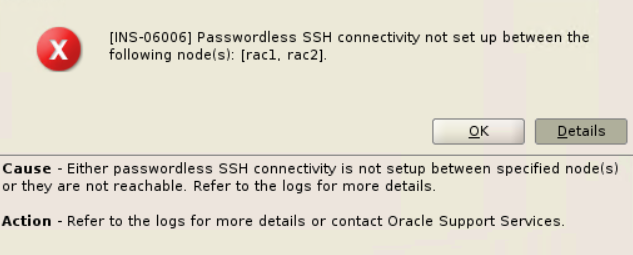
[INS-06006] Passwordless SSH connectivity not set up between the following node(s)
- 2탄 -
RAC 설치 작업 하다보면 위의 메세지를 흔하게 보게 되는데..
해당 메세지의 passwordless ssh 접속불가으로 인해 문제로 고통받는 많은 유저분들을 위해 몇자 적는다.
INS-06006 GI RunInstaller Fails If OpenSSH Is Upgraded to 8.x (Doc ID 2555697.1)
OpenSSH 버전 9.x 대가 설치되어 있는 경우 해당 문서의 기존 workaround 방법이 먹히지 않는 경우가 종종 있다.
현재는 AIX 나 Solaris 계열에서만 해당 증상이 나타나고 있으며 RHEL Linux 계열은 아직 OpenSSH 8.x 가 채택되어 거의 문제가 없다. (주로 RHEL8, RHEL 9 를 사용하고 있으므로)
RHEL 10 부터는 OpenSSH 9.x 가 기본으로 설치되고. 9.x 에서는 새로운 옵션인 -O 가 생겼다.
[root@rhel10 ~]# ssh -V
OpenSSH_9.9p1, OpenSSL 3.2.2 4 Jun 2024
-O Use the legacy SCP protocol for file transfers instead of the SFTP protocol. Forcing the use of the SCP protocol
may be necessary for servers that do not implement SFTP, for backwards-compatibility for particular filename
wildcard patterns and for expanding paths with a ‘~’ prefix for older SFTP servers.
-> SFTP 프로토콜 대신 레거시 SCP 프로토콜 사용하도록 강제화 함.
- 기존의 workaround 해결방법에서 -O 추가옵션 사용가능 (대문자 오)
설치전
# Rename the original scp.
mv /usr/bin/scp /usr/bin/scp.orig
# Create a new file </usr/bin/scp>.
vi /usr/bin/scp
# Add the below line to the new created file </usr/bin/scp>.
/usr/bin/scp.orig -T -O $*
# Change the file permission.
chmod 555 /usr/bin/scp
설치후
mv /usr/bin/scp.orig /usr/bin/scp
다시 passwordless ssh 접속 시도..성공하시길 !!